cancel
Showing results for 
Search instead for 
Did you mean: 

July 7 - July 17 | Round 2 of the Power BI Dataviz World Championships. Don't miss your chance! Learn more

Reply
Anonymous
Not applicable

Datset Refresh Via RUN FLow

I set up a report and dashboard in Power BI and published it to a web link but the 'run flow' function for refreshing the dataset isn't working. Does anybody know why this issue is occurring?

1 ACCEPTED SOLUTION
Anonymous
Not applicable

Hi @Anonymous ,

When you add a Power Automate button visual, Please consider the following considerations and limitations:

  • Additional manual inputs to the button aren't supported at this time. We plan to add support for this by the general availability release.
  • Currently, we only have a few built-in templates; we plan to add more based on user feedback.
  • The visual will only display flows within your default environment. We plan to add support for an environment selector by the general availability release.
  • The visual isn't supported for embedded analytics.
  • The visual isn't supported in sovereign clouds.
  • The visual doesn't work in Publish to Web (public) scenarios, because unauthenticated scenarios aren't supported by Power Automate.
  • The visual isn't certified while in preview. We plan to have complete certification by the general availability release.

For more details, you can read related document: Create a Power Automate visual for Power BI (preview) - Power BI | Microsoft Learn


Best regards,
Community Support Team_Binbin Yu
If this post helps, then please consider Accept it as the solution to help the other members find it more quickly.

View solution in original post

5 REPLIES 5
Anonymous
Not applicable

Hi @Anonymous ,

When you add a Power Automate button visual, Please consider the following considerations and limitations:

  • Additional manual inputs to the button aren't supported at this time. We plan to add support for this by the general availability release.
  • Currently, we only have a few built-in templates; we plan to add more based on user feedback.
  • The visual will only display flows within your default environment. We plan to add support for an environment selector by the general availability release.
  • The visual isn't supported for embedded analytics.
  • The visual isn't supported in sovereign clouds.
  • The visual doesn't work in Publish to Web (public) scenarios, because unauthenticated scenarios aren't supported by Power Automate.
  • The visual isn't certified while in preview. We plan to have complete certification by the general availability release.

For more details, you can read related document: Create a Power Automate visual for Power BI (preview) - Power BI | Microsoft Learn


Best regards,
Community Support Team_Binbin Yu
If this post helps, then please consider Accept it as the solution to help the other members find it more quickly.

Anonymous
Not applicable

@GilbertQ

I am using Power Automate for the Power BI add-on and I want to use the refresh button when embedding the report to publish to the web (public).

Hi @Anonymous 


I think that this might be a limitation in Publish to Web.


Did I answer your question? Mark my post as a solution!

Proud to be a Super User!


Power BI Blog

GilbertQ
Super User
Super User

Hi @Anonymous 


Can you let us know where you are trying to run the flow from?


This can help us assist you fix the issue!


Did I answer your question? Mark my post as a solution!

Proud to be a Super User!


Power BI Blog

Anonymous
Not applicable

@GilbertQ

I am using Power Automate for the Power BI add-on and I want to use the refresh button when embedding the report to publish to the web (public).


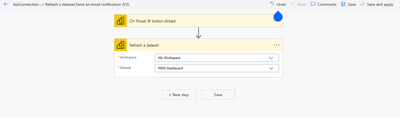
blackbranded_0-1673858085283.png

These are the settings I apply in Flow.

Helpful resources

Announcements
FabCon and SQLCon Barcelona 2026

FabCon & SQLCon – Barcelona 2026

Join us in Barcelona for FabCon and SQLCon, the Fabric, Power BI, SQL, and AI community event. Save €200 with code FABCMTY200.

60 days of Data Days Carousel

Data Days 2026

Join Fabric Data Days 2026: 60 days of free live/on-demand sessions, challenges, study groups, and certification opportunities.

Power BI DataViz World Championships carousel

Power BI DataViz World Championships - June 2026

A new Power BI DataViz World Championship is coming this June! Don't miss out on submitting your entry.