cancel
Showing results for 
Search instead for 
Did you mean: 

We've captured the moments from FabCon & SQLCon that everyone is talking about, and we are bringing them to the community, live and on-demand. Starts on April 14th. Register now

Reply
Anonymous
Not applicable

Date Issues

Dear Team ,


I have Created one report in powerbi Desktop with Date Slicer ,
By default , date its showing MM/DD/YYYY format , but requirement is DD/MM/YYYY format so I have used
Formate function as mentioned { columnname = formate(Teablename[columnname],"DD/MM/YYYY") } post that its displaying in reqquired formate(DD/MM/YYYY) desktop level .


Date formate displayed in Desktop Formate of DD/MM/YYYY.

                  Screen Shot 2017-01-23 at 1.19.59 PM.png
once i published in service its shown MM/DD/YYYY formate ,can you please help me on this how can we solve the date issue in service .


Date formate displayed in Desktop Formate of MM/DD/YYYY.
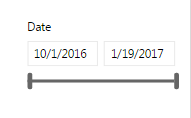
                Screen Shot 2017-01-23 at 1.25.16 PM.png

Note : clients are not showing interest to change the language and date formates in Chrome settings ,So when client open the report how it will display the date in formate of DD/MM/YYYY with out changing the browser settings.


Kindly help me on this .


Thank You in Advance.

Regards,
Srinivas.

3 REPLIES 3
v-yulgu-msft
Microsoft Employee
Microsoft Employee

Hi @Anonymous,


Here is a similar thread for your reference:

Date format changing desktop to web


Best regards,

Yuliana Gu


Community Support Team _ Yuliana Gu
If this post helps, then please consider Accept it as the solution to help the other members find it more quickly.
Anonymous
Not applicable

Hi Yuliana Gu ,


Thank you for your response , I have gone through  the post , But solution given as needed to change the browser settings (Need to change the language UK). But the problem is client it's not  showing interest to change the brwoser settings . So by default need to display date format DD/MM/YYYY in power bi service without changing the browser settings.


Kindly provide me the solution.


Thank You .

Srinivas.

Anonymous
Not applicable

Hi All , 


Still i am facing the same issue , Kindly help me on this issue .


Thanks,

Srinivas.

Helpful resources

Announcements
New to Fabric survey Carousel

New to Fabric Survey

If you have recently started exploring Fabric, we'd love to hear how it's going. Your feedback can help with product improvements.

Power BI DataViz World Championships carousel

Power BI DataViz World Championships - June 2026

A new Power BI DataViz World Championship is coming this June! Don't miss out on submitting your entry.

Join our Fabric User Panel

Join our Fabric User Panel

Share feedback directly with Fabric product managers, participate in targeted research studies and influence the Fabric roadmap.