This time we’re going bigger than ever. Fabric, Power BI, SQL, AI and more. We're covering it all. You won't want to miss it.
Learn moreLevel up your Power BI skills this month - build one visual each week and tell better stories with data! Get started
My datasets are not refreshing. There aren't any errors showing but the datasets do not refresh. It is CRITICAL that I have current information on my reports. Any idea how to fix this?
Hi @Christine218,
What is the data source? How did you connect to it? And how did you set scheduled refresh for it? Besides, test whether the displayed data is updated if clicking refresh button manually.
Regards,
Yuliana Gu
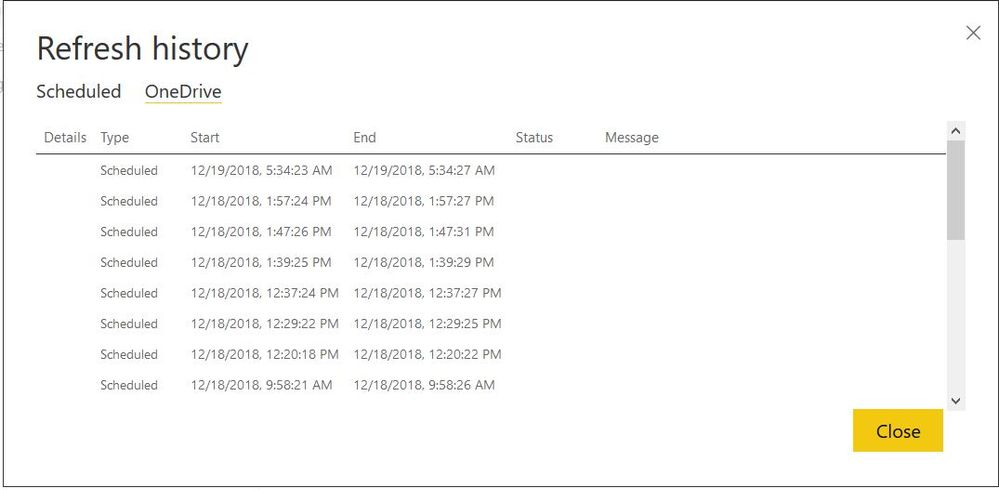
The data source is an Excel workbook housed on a Sharepoint site. I didn't set the schedule refresh. Those "unprocesed" refreshes are from me hitting the manual refresh after I realized that it wasn't updating.
Hi @Christine218,
From the "Refresh History", I noticed that the refresh type was "Scheduled". Please check again whether you configured scheduled refresh for this dataset.
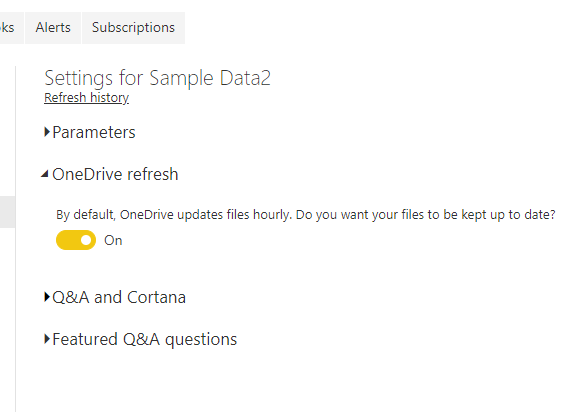
Besides, please turn off the "One Drive refresh" option for a test.
Best regards,
Yuliana Gu
I already did that and tried the refresh. It still didn't update. But I want it to autorefresh from OneDrive and it isn't. I need to rely on current data. How do I fix this??
Check out the April 2026 Power BI update to learn about new features.
Sign up to receive a private message when registration opens and key events begin.
If you have recently started exploring Fabric, we'd love to hear how it's going. Your feedback can help with product improvements.
| User | Count |
|---|---|
| 11 | |
| 9 | |
| 8 | |
| 8 | |
| 7 |
| User | Count |
|---|---|
| 48 | |
| 27 | |
| 25 | |
| 24 | |
| 22 |