This is best Fabric, Power BI, SQL and AI community event. How do we know? The last event sold out! Save €200 with code FABCMTY200.
Register nowA new Data Days event is coming soon! This time we’re going bigger than ever. Fabric, Power BI, SQL, AI and more. Don't miss out.
Hi,
I have a dataset connecting to a dataflow. I also create a flow that refreshes this dataset automatically once the dataflow is refreshed.
With the schedule refresh, we can set up email notifications when refresh fails. Are we able to set up this type of notification when the dataset fails to refresh?
In Refresh history, this type of refresh through power automate is blank while scheduled refresh lists scheduled and manual refresh lists on demand.
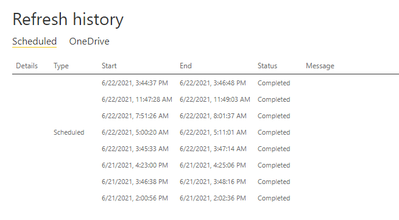
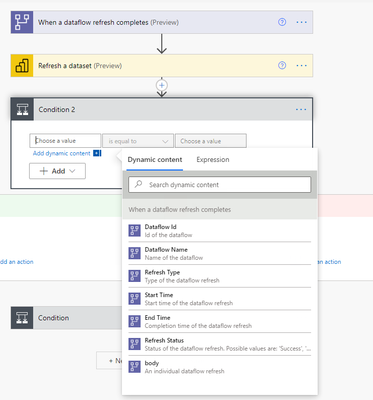
I've tried to set up a step in power automate to notify when dataset refresh failed, but there is no option except notification when dataflow failed to refresh, so i am looking at a way in PBI service that sends notification of failure like scheduled refresh failure notification
Solved! Go to Solution.
Hi @Anonymous ,
As far as I know , the dataset refresh by the rest api will not list in the refresh history. But you can get all the refresh history by the rest api :https://docs.microsoft.com/zh-cn/rest/api/power-bi/datasets/get-refresh-history-in-group
Email notifications is for scheduled refresh in power bi service. You may need to set a step in power automate to trace the refresh by api . I am not fimilar about the power automate, I think you should open a thread in power automate forum.
If this post helps, then please consider Accept it as the solution to help the other members find it more quickly.
Best Regards,
Dedmon Dai
We are also having the same problem. If a dataset refresh option is given in Power Automate or through API. The failure and Success email notifications should not be so complicated to setup for a dataset.
Hi @Anonymous ,
As far as I know , the dataset refresh by the rest api will not list in the refresh history. But you can get all the refresh history by the rest api :https://docs.microsoft.com/zh-cn/rest/api/power-bi/datasets/get-refresh-history-in-group
Email notifications is for scheduled refresh in power bi service. You may need to set a step in power automate to trace the refresh by api . I am not fimilar about the power automate, I think you should open a thread in power automate forum.
If this post helps, then please consider Accept it as the solution to help the other members find it more quickly.
Best Regards,
Dedmon Dai
Thank you Dedmon Dai!
@Anonymous I have the same concern with you. I wonder if you have any solution for this yet?
Check out the May 2026 Power BI update to learn about new features.
Sign up to receive a private message when registration opens and key events begin.
If you have recently started exploring Fabric, we'd love to hear how it's going. Your feedback can help with product improvements.
| User | Count |
|---|---|
| 11 | |
| 10 | |
| 7 | |
| 7 | |
| 7 |
| User | Count |
|---|---|
| 24 | |
| 23 | |
| 21 | |
| 21 | |
| 19 |