@PA_DA
If your users are encountering an error message stating they cannot access the data model, despite having the appropriate permissions in a Power BI Premium Per User (PPU) workspace, there are a few potential issues to consider:
License Type:
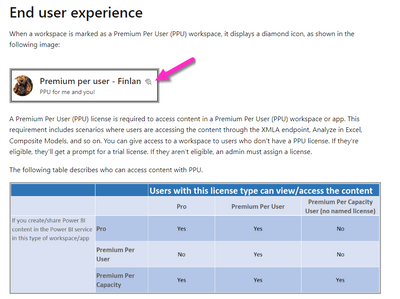
- Ensure that the users trying to access the dataset have Power BI Pro or Premium Per User (PPU) licenses. They need one of these licenses to view datasets in a PPU workspace.
App Permissions:
- Verify that the app through which the users are trying to access the dataset has the necessary permissions. The app should be configured with access rights to the dataset in the PPU workspace.
Workspace Access:
- Check that the users have appropriate access to the workspace itself. They should be added as members or assigned to a security group that has access to the workspace.
Permissions within the Dataset:
- Even if users have access to the workspace, ensure that they have been granted appropriate permissions within the dataset. They need at least "Read" access to view the data model.
Cross-Workspace Access:
- If the users are trying to access content in a different workspace, make sure they have been granted access to that workspace as well.
Data Source Access:
- Verify that the data source(s) used in the dataset are accessible to the users. If there are any credentials required to access the data source, make sure those are properly configured.
If you find this insightful, please provide a Kudo and accept this as a solution.