cancel
Showing results for 
Search instead for 
Did you mean: 

July 28 - August 9 | Final Round of the Power BI Dataviz World Championships. This is your chance. Learn more

Reply
thedaxlearning
Regular Visitor

Dataflows: Getting query folding error after changing to incremental refresh

I've got a dataflow that's pulling data from Snowflake and I've got reports connecting to that dataflow via DirectQuery.


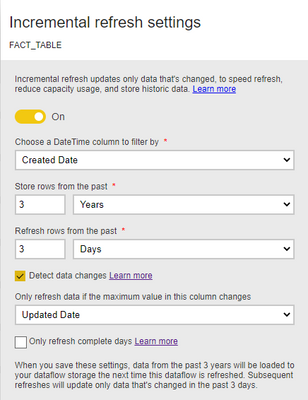
It's been running smoothly before, but yesterday I decided to change the dataflow to incremental refresh since it's been taking hours to refresh. Used this setup:

thedaxlearning_0-1648507900949.png


I ran the refresh after changing it to incremental and tested--everything worked fine. But today, after the incremental refresh happened, I'm getting the error on the visuals saying "We couldn't fold the expression to the data source. Please try a simpler expression.." and on Power Query it's saying "This step results in a query not supported in DirectQuery mode".


I'm sure that this is because of the Incremental Refresh since after disabling incremental refresh, and refreshing the dataflow it's working again. But, I want to understand why incremental refresh did that. Did I set it up incorrectly?

P.S. Not sure if it's relevant but, not all the tables that I'd set to incrementally refresh had the error, I notice that on the refresh history the tables getting the error had 2 refresh partitions (IncrementalRefreshPolicyPartition-2022Q10327 and IncrementalRefreshPolicyPartition-2022Q10328).

1 REPLY 1
v-easonf-msft
Community Support
Community Support

Hi, @thedaxlearning 

Please refer to Incremental refresh and real-time data for datasets.


Because support for query folding is different for different types of data sources, verification should be performed to ensure the filter logic is included in the queries being executed against the data source. In most cases, Power BI Desktop attempts to perform this verification for you when defining the incremental refresh policy. For SQL based data sources such as SQL Database, Azure Synapse, Oracle, and Teradata, this verification is reliable. However, other data sources may be unable to verify without tracing the queries. If Power BI Desktop is unable to confirm, a warning is shown in the Incremental refresh policy configuration dialog.

Best Regards,
Community Support Team _ Eason

Helpful resources

Announcements
FabCon and SQLCon Barcelona 2026

FabCon & SQLCon – Barcelona 2026

Join us in Barcelona for FabCon and SQLCon, the Fabric, Power BI, SQL, and AI community event. Save €200 with code FABCMTY200.

Fabric Community Sticker Design Challenge Barcelona Carousel

Fabric Community Sticker Challenge - Barcelona 2026

If you love stickers, then you will definitely want to check out our community sticker challenge, Barcelona edition!

July Power BI Update Carousel

Power BI Monthly Update - July 2026

Check out the July 2026 Power BI update to learn about new features.

Power BI DataViz World Championships carousel

Power BI DataViz World Championships - June 2026

A new Power BI DataViz World Championship is coming this June! Don't miss out on submitting your entry.

Top Kudoed Authors