Don't miss your chance to take the Fabric Data Engineer (DP-600) exam for FREE! Find out how by attending the DP-600 session on April 23rd (pacific time), live or on-demand.
Learn moreJoin the FabCon + SQLCon recap series. Up next: Power BI, Real-Time Intelligence, IQ and AI, and Data Factory take center stage. All sessions are available on-demand after the live show. Register now
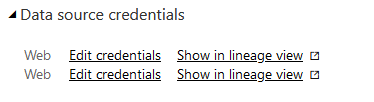
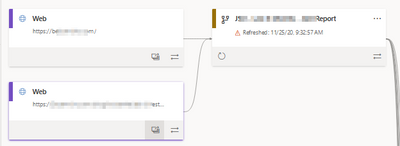
I'm having an issue refreshing this dataflow and I believe it is because there is an extra set of credentials. Is there a way to manually remove the extra one? I only have one entity with one data source for this workflow.
Hi, @paulmadison
If you still have no idea about your problem, you can open a support ticket with MSFT to seek technical support , usually they will have better suggestions.
https://powerbi.microsoft.com/en-us/support/
Best Regards,
Community Support Team _ Eason
Hi, @paulmadison
Please check if this related thread is helpful.
https://community.powerbi.com/t5/Issues/Clearing-permissions-from-data-flows/idi-p/737437
Best Regards,
Community Support Team _ Eason
That does not help. There is not a delete credentials options in the settings.
The extra credentials seem to be left over from an entity that doesn't exist anymore and are not in the current power query for that dataflow.
Check out the April 2026 Power BI update to learn about new features.
If you have recently started exploring Fabric, we'd love to hear how it's going. Your feedback can help with product improvements.
A new Power BI DataViz World Championship is coming this June! Don't miss out on submitting your entry.
| User | Count |
|---|---|
| 8 | |
| 8 | |
| 8 | |
| 8 | |
| 7 |
| User | Count |
|---|---|
| 32 | |
| 31 | |
| 20 | |
| 19 | |
| 17 |