This time we’re going bigger than ever. Fabric, Power BI, SQL, AI and more. We're covering it all. You won't want to miss it.
Learn moreDid you hear? There's a new SQL AI Developer certification (DP-800). Start preparing now and be one of the first to get certified. Register now
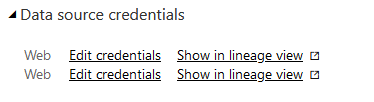
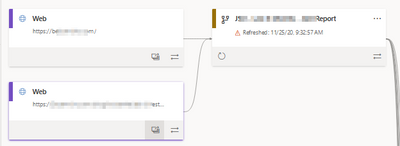
I'm having an issue refreshing this dataflow and I believe it is because there is an extra set of credentials. Is there a way to manually remove the extra one? I only have one entity with one data source for this workflow.
Hi, @paulmadison
If you still have no idea about your problem, you can open a support ticket with MSFT to seek technical support , usually they will have better suggestions.
https://powerbi.microsoft.com/en-us/support/
Best Regards,
Community Support Team _ Eason
Hi, @paulmadison
Please check if this related thread is helpful.
https://community.powerbi.com/t5/Issues/Clearing-permissions-from-data-flows/idi-p/737437
Best Regards,
Community Support Team _ Eason
That does not help. There is not a delete credentials options in the settings.
The extra credentials seem to be left over from an entity that doesn't exist anymore and are not in the current power query for that dataflow.
Check out the April 2026 Power BI update to learn about new features.
Sign up to receive a private message when registration opens and key events begin.
If you have recently started exploring Fabric, we'd love to hear how it's going. Your feedback can help with product improvements.
| User | Count |
|---|---|
| 10 | |
| 8 | |
| 8 | |
| 8 | |
| 7 |
| User | Count |
|---|---|
| 49 | |
| 27 | |
| 24 | |
| 20 | |
| 20 |