cancel
Showing results for 
Search instead for 
Did you mean: 

Learn from the best! Meet the four finalists headed to the FINALS of the Power BI Dataviz World Championships! Register now

Reply
leoacarlos
Frequent Visitor

Dataflow does not appear

Good afternoon to all, my name is Leonardo.
I'm developing a dataflow routine.
1 ° Cryo workspace with nothing
2 ° I create the dataflow within this new worspace

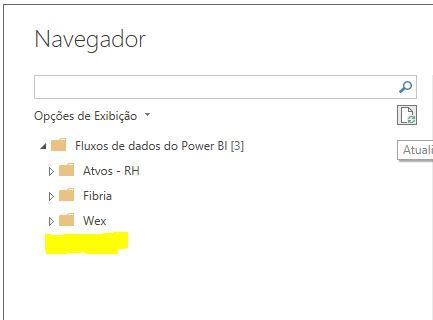
The problem is when consulting the dataflow on the desktop.
I do not see the option to select the created dataflow, even if it is normal, updating, with gateway operating etc.


What can it be? how do I display my dataflow in the desktop connector.1.png2.JPG

2 REPLIES 2
v-cherch-msft
Microsoft Employee
Microsoft Employee

Hi @leoacarlos 

Please check if this post could help.If it is not your case,you could try to open a support ticket. If you have a Pro account it is free. Go to https://support.powerbi.com. Scroll down and click "CREATE SUPPORT TICKET".

Regards,

Community Support Team _ Cherie Chen
If this post helps, then please consider Accept it as the solution to help the other members find it more quickly.

Hi @v-cherch-msft 

how are you?


Did not work.

But I'll give Addendum, If I create the stream in a workspace that I already have, it brings in the normal desktop.

The error is happening when I create exclusively in a new workspace.


Thx

Helpful resources

Announcements
Join our Fabric User Panel

Join our Fabric User Panel

Share feedback directly with Fabric product managers, participate in targeted research studies and influence the Fabric roadmap.

February Power BI Update Carousel

Power BI Monthly Update - February 2026

Check out the February 2026 Power BI update to learn about new features.

FabCon Atlanta 2026 carousel

FabCon Atlanta 2026

Join us at FabCon Atlanta, March 16-20, for the ultimate Fabric, Power BI, AI and SQL community-led event. Save $200 with code FABCOMM.