Join us at FabCon Atlanta from March 16 - 20, 2026, for the ultimate Fabric, Power BI, AI and SQL community-led event. Save $200 with code FABCOMM.
Register now!The Power BI Data Visualization World Championships is back! Get ahead of the game and start preparing now! Learn more
I am trying to create a Power BI Dataflow. Here is my mcode below:
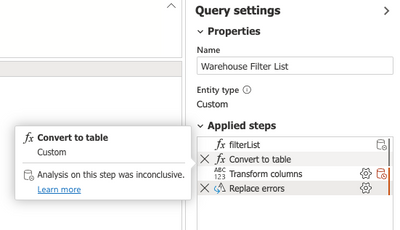
The issue is when I publish/refresh the dataflow, it automatically converts my list back into a table. I need this to remain a list so I can use these values as a filter for a column in my other reports. Is this a bug? I need a way to prevent the Power BI Service from automatically converting this list back into a table. I have a screenshot below.
My code creates that first applied step. Once I Save and Close the last 3 steps are automatically created and I can not find a way to keep this from happening.
Help is much appreciated!
Solved! Go to Solution.
If you disable it, then yeah, they won't load in other dataflows. But you cannot load a "list" - it will autoconvert to table. Which is fine. Access that table in another dataflow, then convert it to a list within the dataflow, and use it as your fitler. Easiest way to convert a table column to a list is to right-click on it and select drill down.
DAX is for Analysis. Power Query is for Data Modeling
Proud to be a Super User!
MCSA: BI ReportingIs that query being loaded? If so, right-click on it and uncheck "enable load."
Dataflows cannot store lists in the table, but they can keep the lists in queries. I do it all of the time.
DAX is for Analysis. Power Query is for Data Modeling
Proud to be a Super User!
MCSA: BI ReportingBasically, the issue I have is that I might have dozens of tables in each of my dataflows that all need to be filtered by these values in the Warehouse columns: "P1", "B1", "J1", "JC", "L1", "Y1", "48", "83", "84", "86", "92", "97".
What I am currently having to do is manually go into each table in each of my dataflows and manually filter by these values. I was hoping to create a dataflow to load into my workspace, then in the other dataflows, use the list from this dataflow to filter all tables with the Warehouse column with the desired values. I need all reports/datasets/dataflows with the Warehouse column to be filtered by these values. Does this make sense?
If I disable the load, it will not allow me to retrieve the list in my other dataflows. I was hoping to not have to make this query/table in each of my separate dataflows. Let me know if you have any ideas. I appreciate the help so far.
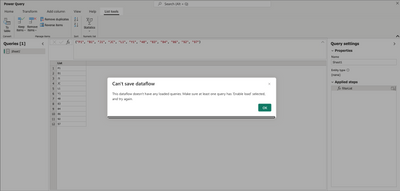
Here is an example below:
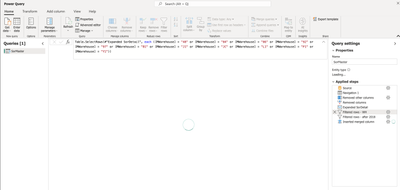
I have 4 dataflows (and growing) in my workspace. Some of the dataflows have 3 or 4 tables in them. If the tables have a "MWarehouse" column, I need to filter by those values. Ideally, I want to load the dataflow into each of my other dataflows so that I can retrieve the warehouse values. If I change one of the warehouses in the Warehouse dataflow, all dataflows/tables in the workspace would be adjusted with the desired warehouse filter.
If you disable it, then yeah, they won't load in other dataflows. But you cannot load a "list" - it will autoconvert to table. Which is fine. Access that table in another dataflow, then convert it to a list within the dataflow, and use it as your fitler. Easiest way to convert a table column to a list is to right-click on it and select drill down.
DAX is for Analysis. Power Query is for Data Modeling
Proud to be a Super User!
MCSA: BI ReportingI don't know why I didn't think to load as a table, then convert to a list in each dataflow. It's an added step, but that works! Thanks
The Power BI Data Visualization World Championships is back! Get ahead of the game and start preparing now!
Check out the November 2025 Power BI update to learn about new features.