

Don't miss your chance to take the Fabric Data Engineer (DP-600) exam for FREE! Find out how by watching the DP-600 session on-demand now through April 28th.
Learn moreJoin the FabCon + SQLCon recap series. Up next: Power BI, Real-Time Intelligence, IQ and AI, and Data Factory take center stage. All sessions are available on-demand after the live show. Register now
Since 06/30/2020 my dataflows that connect to SharePoint data have failed and keep failing.
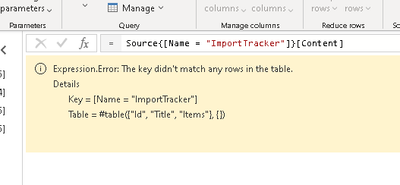
It apears the source (Name = have changed from Names to GUUID's.
Has anyone seen this?
If i connect to a new instance of the list as if I am trying to create a new dataflow, the Navigation parses a GUUID.
Than I can see the data fine.
Solved! Go to Solution.
Hi @ScottBrown ,
If you wan to change the datasource, you should ensure original steps can works on new source.(the steps which start from "Navigation")
For example:
Your original table name is "ImportTracker", but the new source not contain the "ImportTracker", it will show the error message which you mentioned.
Best Regards,
Liang
If this post helps, then please consider Accept it as the solution to help the other members find it more quickly.
Correct Llang,
However, the list name has not chaned.
If I create a new connection to the Same "Import Tracker" list, it shows up as a GUUID instead per the atatched pictures.
Nothing changed on my side during this period, but something changed on the back end - not from me.
Now, the refresh no longer works.
The same issue exists on all dataflow entities that connect to SharePoint lists.
All other data sources ie SQl, file, ACCess and such that we use still refresh.
I tried the API suggestion, no luck. The issue is the Name scope changed on the backend by MS. It only appears to recognize GUUID, not the SP list name.
Check out the April 2026 Power BI update to learn about new features.
If you have recently started exploring Fabric, we'd love to hear how it's going. Your feedback can help with product improvements.
A new Power BI DataViz World Championship is coming this June! Don't miss out on submitting your entry.
| User | Count |
|---|---|
| 9 | |
| 8 | |
| 8 | |
| 8 | |
| 7 |
| User | Count |
|---|---|
| 37 | |
| 29 | |
| 26 | |
| 19 | |
| 19 |