Don't miss your chance to take the Fabric Data Engineer (DP-700) exam on us!
Learn moreWe've captured the moments from FabCon & SQLCon that everyone is talking about, and we are bringing them to the community, live and on-demand. Starts on April 14th. Register now
Hi,
I have setup dataflow in Power BI portal and get data from that dataflow to my reports. And I have setup scedule gatway connection into that report. When my machine is offline my reports are not refreshing.
Can someone please tell me why?
Thanks,
C
Solved! Go to Solution.
Hi, @cham ;
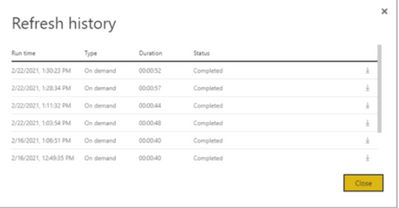
You may need to check the refresh failure history.how a dataflow refresh operation performs, review the Refresh History for the dataflow by navigating to Dataflow > Settings > Refresh History. You can also select the dataflow in the Workspace > context menu (…) > Refresh History.
Best Regards,
Community Support Team_ Yalan Wu
If this post helps, then please consider Accept it as the solution to help the other members find it more quickly.
Hi, @cham ;
You may need to check the refresh failure history.how a dataflow refresh operation performs, review the Refresh History for the dataflow by navigating to Dataflow > Settings > Refresh History. You can also select the dataflow in the Workspace > context menu (…) > Refresh History.
Best Regards,
Community Support Team_ Yalan Wu
If this post helps, then please consider Accept it as the solution to help the other members find it more quickly.
If you have recently started exploring Fabric, we'd love to hear how it's going. Your feedback can help with product improvements.
A new Power BI DataViz World Championship is coming this June! Don't miss out on submitting your entry.
Share feedback directly with Fabric product managers, participate in targeted research studies and influence the Fabric roadmap.