Join us at FabCon Atlanta from March 16 - 20, 2026, for the ultimate Fabric, Power BI, AI and SQL community-led event. Save $200 with code FABCOMM.
Register now!The Power BI Data Visualization World Championships is back! Get ahead of the game and start preparing now! Learn more
I have a dataflow which is getting data from OneDrive every week. The time is referenced by Week number & Year(number). Using these 2 columns, I have created a datetime column(month), where
month=#datetime([Year],Number.RoundUp([Week]/13*3),1,0,0,0).
Using this month column, how can I set incremental refresh for the dataflow, so that only new/uploaded(on OneDrive) data gets refreshed, whereas remaining stay as it is.
I want the data from last 2 years only i.e. for 20th Sep,2020 I want the data from 20th Sep,2018 till 20th Sep,2020
Hi @Anonymous ,
1.A DateTime column is required in the table.(YYYY-MM-DD HH:MM:SS)
2.In your case ,filter by this DateTime feld and set "Store rows from the past " as 2, "Refresh rows from the past " as 7.
Here is the official document.
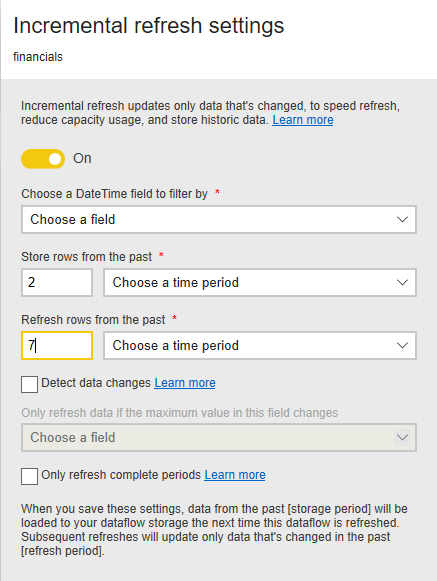
In addition,If you want to Get Data from Power BI Dataflows and set Incremental refresh, follow these steps:
1.Create parameter “RangeStart” and “RangeEnd” in Query Editor
2.Right-click table name in Filed tab --> Select Incremental Refresh --> Input Store data for the most recent X days (e.g. 2 Years) and keep refreshing the data for the most recent 7 days (e.g. the last 5 days), if the day is not finished, just refresh to yesterday.
3.Publish to service --> Configure gateway -->Configure scheduled refresh.
You could take a look at this document for more information.
Did I answer your question ? Please mark my reply as solution. Thank you very much.
If not, please upload some insensitive data samples and expected output.
Best Regards,
Eyelyn Qin
hi @Anonymous - You can refer to the detailed Microsoft documentation for setting up incremental refreshes on dataflows
Please mark the post as a solution and provide a 👍 if my comment helped with solving your issue. Thanks!
Proud to be a Super User!
The Power BI Data Visualization World Championships is back! Get ahead of the game and start preparing now!