This time we’re going bigger than ever. Fabric, Power BI, SQL, AI and more. We're covering it all. You won't want to miss it.
Learn moreLevel up your Power BI skills this month - build one visual each week and tell better stories with data! Get started
Hi, i'm facing some problems with refreshing the data on my pbi report that was published.
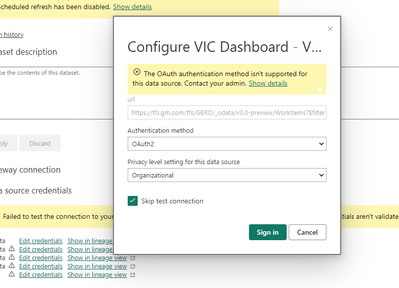
When I try to refresh it, it shows a message saying
"Scheduled refresh is disabled because at least one data source is missing credentials. To start the refresh again, go to this dataset's settings page and enter credentials for all data sources. Then reactivate scheduled refresh."
I tried to edit the credentials on dataset settings as asked, but the Organizational authentication method is missing. Wich it was the method I used to connect on my Report Desktop. Does anyone can help me on that?
Should be OAuth2, but you can also try them all until one works, it won't hurt anything.
yeah, I tried all of them before coming here 🙂
But none worked of course
I was wondering if there's a way to use my current credentials authentification method as I used on PBI Desktop
Interesting, I've only ever used the Windows auth for local servers which then required a Gateway for Service to connect.
Check out the April 2026 Power BI update to learn about new features.
Sign up to receive a private message when registration opens and key events begin.
If you have recently started exploring Fabric, we'd love to hear how it's going. Your feedback can help with product improvements.
| User | Count |
|---|---|
| 11 | |
| 9 | |
| 9 | |
| 7 | |
| 6 |
| User | Count |
|---|---|
| 46 | |
| 27 | |
| 24 | |
| 23 | |
| 22 |