Get certified for free when you join Fabric Data Days 2026 and dive into Fabric, Power BI, SQL, AI, and other essential data skills.
Join nowJuly 7 - July 17 | Round 2 of the Power BI Dataviz World Championships. Don't miss your chance! Learn more
Hi everyone,
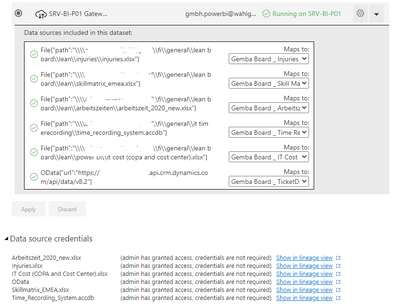
I am doing a report which carries many data sources (access file, excel files and D365CRM). The report is done in Power BI Desktop and refresh without any error. I uploaded the report to PBI Service and setup the Data Gateway, all works well as below
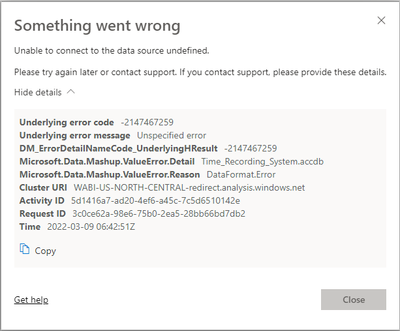
Then I set up refresh schedule and try to refresh the data. But I got the failure when refreshing with below notification
As I understanding the error alert a problem from access file but I checked once again the file in Power BI Desktop, try to fix all the format and refresh in Power BI Desktop. No any errors there. I uploaded again new saved file to same workpace, and set up again the data gateway. When I refresh, it still appears.
Could you please help me in this case? I do not know where to fix this problem.
Thanks so much
Thu
Hi @ThuJa23 ,
The following information was obtained from an internal search:
“Microsoft.PowerBI.DataMovement.Pipeline.Diagnostics.MashupDataAccessValueException: Mashup expression evaluation error.’
You can try the following:
Do you have a calculated table in your composite model, and if so, you can delete it on refresh.
You can export the additional logging mashup file in the gateway to see if there is a problem
Best Regards,
Liu Yang
If this post helps, then please consider Accept it as the solution to help the other members find it more quickly.
Join us in Barcelona for FabCon and SQLCon, the Fabric, Power BI, SQL, and AI community event. Save €200 with code FABCMTY200.
Join Data Days 2026: 60 days of free live/on-demand sessions, challenges, study groups, and certification opportunities.
| User | Count |
|---|---|
| 23 | |
| 12 | |
| 10 | |
| 10 | |
| 4 |
| User | Count |
|---|---|
| 32 | |
| 31 | |
| 27 | |
| 26 | |
| 21 |