Don't miss your chance to take the Fabric Data Engineer (DP-600) exam for FREE! Find out how by watching the DP-600 session on-demand now through April 28th.
Learn moreJoin the FabCon + SQLCon recap series. Up next: Power BI, Real-Time Intelligence, IQ and AI, and Data Factory take center stage. All sessions are available on-demand after the live show. Register now
Hi all,
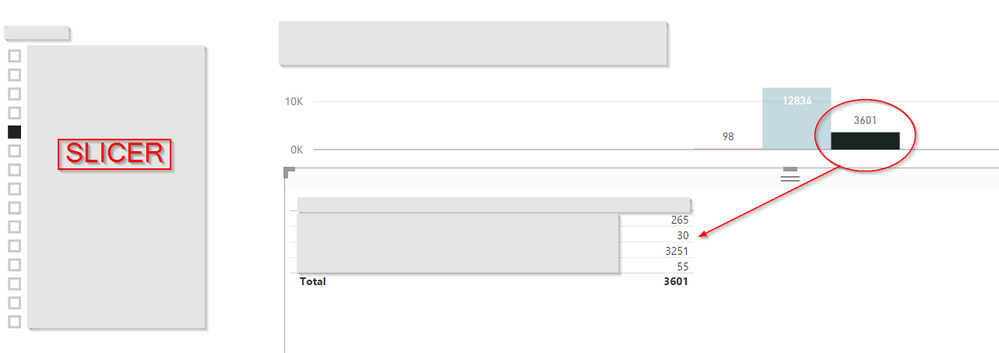
I have a strange issue that I can't seem to figure out. Please see the following Image:
As you can see, I have a slicer. Based on the option I choose, the (clustered column) chart on the top-right is presented. If I click/select the black option in the visualization, you can see how it splits up in the bottom table visualization. So far so good.
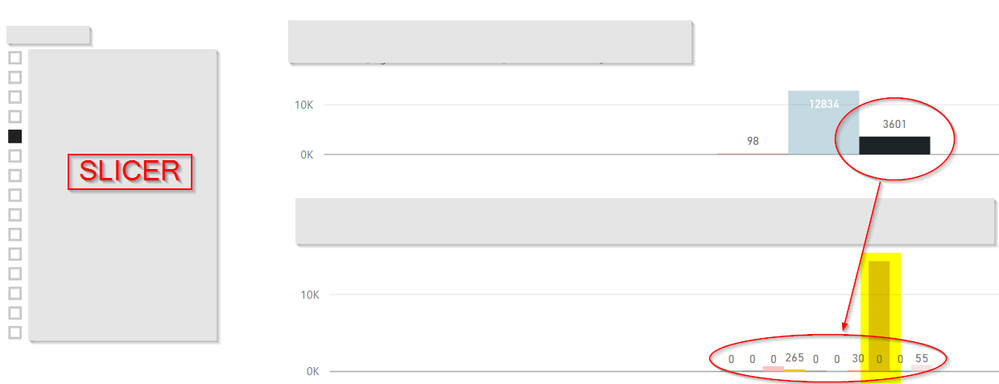
Now, if I change the table visualization to a clustered column visualization (and nothing else), I get this:
So, as you can see, values just drop out of the visualization. The yellow section should be around 3300, but it just shows zero. I have the same issue with other graphical visualizations (Pie chart, Funnel, for example). The tables work, the Area Chart works, so it's not like the data isn't there.
Any suggestions on what might be wrong? Is there some kind of bug, or is it me?
Thanks!
Hi Matt,
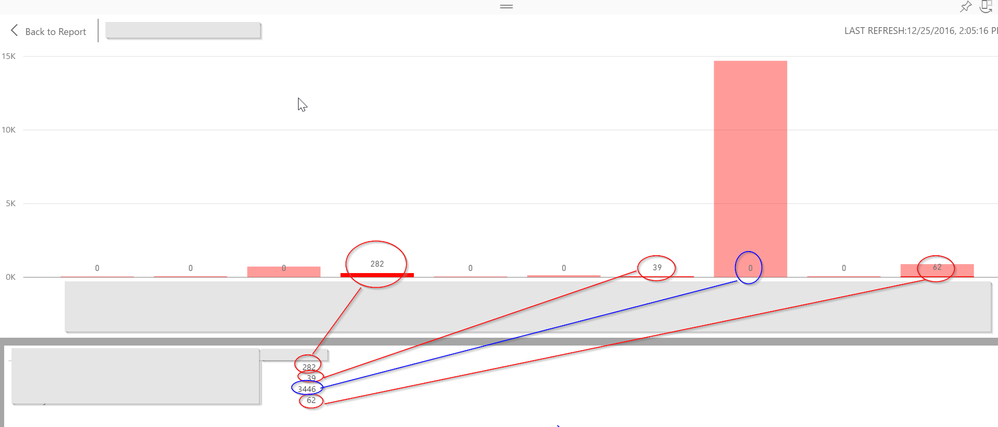
If I show the data, the number is there, but it's not visualized (3446 in the data, 0 in the chart):
Hi @Furanity,
According to your description, I have tested it on my side, and I can't reproduce this issue. Could you share a sample pbix file which can reproduce this issue? You can upload it to OneDrive or Dropbox and post the link here. Do mask sensitive data before uploading.![]()
Regards
Hi,
I'm not sure how I can share my PBIX, since I use DirectQuery (on an on premises SQL via my Gateway) and not an import. I can't share my report, since you're outside my organization and sending you the PBIX would probably not work.
If I use Import Mode by the way, the numbers do add up, so it seems to be tied to the DIrectQuery Mode.
Regards
Hi @Furanity,
That's a little weird. I just tested it with DirectQuery(on my on-premises SQL via my Gateway too), however, I still can't reproduce this issue.
In this scenario, I would suggest you to send a frown and report it as Matt mentioned above.![]()
Regards
Well it seems like a bug then I guess. You can send a frown and report it
What happens when you click on see data from the visual?
Check out the April 2026 Power BI update to learn about new features.
If you have recently started exploring Fabric, we'd love to hear how it's going. Your feedback can help with product improvements.
A new Power BI DataViz World Championship is coming this June! Don't miss out on submitting your entry.
| User | Count |
|---|---|
| 9 | |
| 8 | |
| 8 | |
| 8 | |
| 7 |
| User | Count |
|---|---|
| 37 | |
| 29 | |
| 26 | |
| 19 | |
| 19 |