cancel
Showing results for 
Search instead for 
Did you mean: 

The Power BI Data Visualization World Championships is back! It's time to submit your entry. Live now!

Reply
99
Regular Visitor

Data from sample?

I was viewing this sample https://powerbi.microsoft.com/en-us/documentation/powerbi-sample-human-resources-take-a-tour/ and I would love to recreate those visuals with our company data. I have reports in excel format, but I am not sure what data I need and how to format it so that I can view the same types of reports. When I try to download the data in excel, I can either view the summarized version, which doesn't seem to come close to what I need and then I can look at the full version, which has everything parsed out after PowerBI analyzed the data. 

I would love a tutorial on what exactly I need to put together on an excel spreadsheet and how to upload/edit the data so that I can have the same views.

1 ACCEPTED SOLUTION
v-sihou-msft
Microsoft Employee
Microsoft Employee

@99


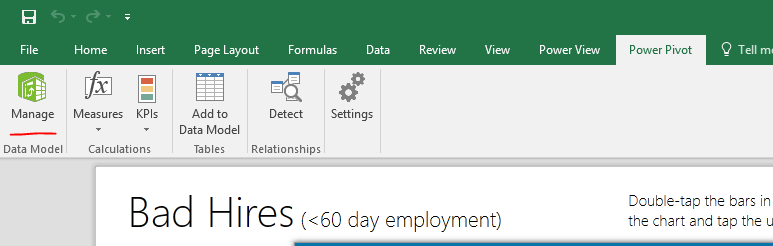
In the sample workbook, the Power View report is fed by a Power Pivot model. You need to import those tables into Power Pivot, then build into a data model. You can also use Power BI Desktop connect this workbook for creating reports.


55.PNG


For more details, please see: 


Use the Data Model in Power View


Regards,

View solution in original post

1 REPLY 1
v-sihou-msft
Microsoft Employee
Microsoft Employee

@99


In the sample workbook, the Power View report is fed by a Power Pivot model. You need to import those tables into Power Pivot, then build into a data model. You can also use Power BI Desktop connect this workbook for creating reports.


55.PNG


For more details, please see: 


Use the Data Model in Power View


Regards,

Helpful resources

Announcements
December 2025 Power BI Update Carousel

Power BI Monthly Update - December 2025

Check out the December 2025 Power BI Holiday Recap!

FabCon Atlanta 2026 carousel

FabCon Atlanta 2026

Join us at FabCon Atlanta, March 16-20, for the ultimate Fabric, Power BI, AI and SQL community-led event. Save $200 with code FABCOMM.