Don't miss your chance to take the Fabric Data Engineer (DP-600) exam for FREE! Find out how by watching the DP-600 session on-demand now through April 28th.
Learn moreJoin the FabCon + SQLCon recap series. Up next: Power BI, Real-Time Intelligence, IQ and AI, and Data Factory take center stage. All sessions are available on-demand after the live show. Register now
Hi,
When a large dataflow (time taken for completion approx 4 hours) is executed against a On-prem data source via a gateway , does it create any kind of temp file or anything else which can cause disk space (storage) related issues on the gateway server ?
It was observed on the gateway server that C:\ was more than 90% utilized for a shorter period ( 5mins) while the installation of gateway is on D:\ . So not sure if there's any relation there
Regards,
Ambarish Kunte
Solved! Go to Solution.
Hi @ambarishkunte ,
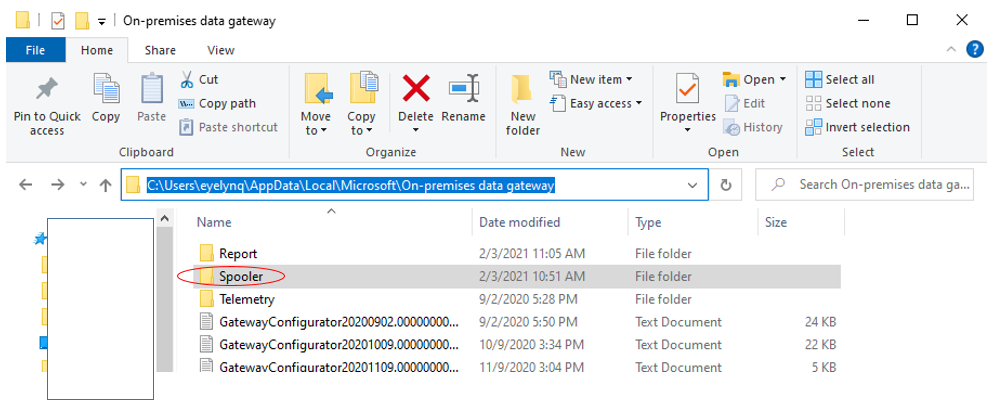
To my knowledge, you cannot set the spooling location to a custom directory.
I have re-installed gateway(enterprise) on D disk , it is still located in C disk:
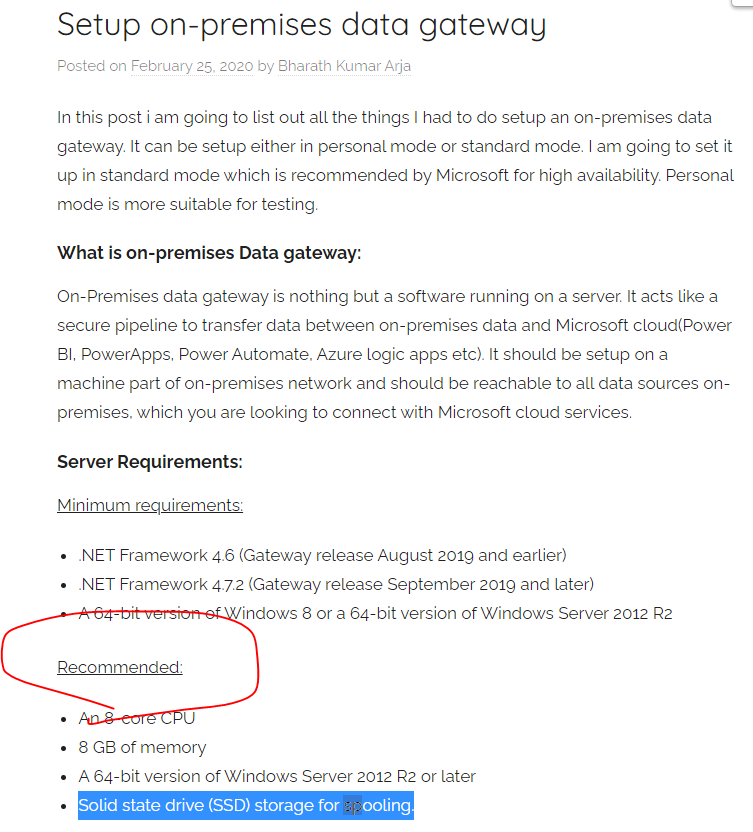
So as I mentioned before, when installing the gateway,we recommend you use a solid-state drive (SSD) as the spooling storage.
Refer to :
https://community.powerbi.com/t5/Service/Gateway-spooling-storage/m-p/941070
https://sharepointviews.com/setup-on-premises-data-gateway/
Best Regards,
Eyelyn Qin
If this post helps, then please consider Accept it as the solution to help the other members find it more quickly.
Hi @ambarishkunte ,
To my knowledge, you cannot set the spooling location to a custom directory.
I have re-installed gateway(enterprise) on D disk , it is still located in C disk:
So as I mentioned before, when installing the gateway,we recommend you use a solid-state drive (SSD) as the spooling storage.
Refer to :
https://community.powerbi.com/t5/Service/Gateway-spooling-storage/m-p/941070
https://sharepointviews.com/setup-on-premises-data-gateway/
Best Regards,
Eyelyn Qin
If this post helps, then please consider Accept it as the solution to help the other members find it more quickly.
Hi @ambarishkunte ,
According to the official document about On-premises data gateway architecture ,You could know how the gateway works:
In step 6 , queries like Power BI refreshes and Azure Analysis Services refreshes can return large amounts of data. For such queries, data is temporarily stored on the gateway machine. This data storage continues until all data is received from the data source. The data is then sent back to the cloud service. This process is called spooling. We recommend you use a solid-state drive (SSD) as the spooling storage.
Best Regards,
Eyelyn Qin
If this post helps, then please consider Accept it as the solution to help the other members find it more quickly.
Thanks Eyelyn .
The On-Prem Data Gateway is installed on a D:\ while it seems like the temp files are created in C:\ . Is there a way the location of generated temp file could be configured/changed ?
Regards,
Ambarish Kunte
Check out the April 2026 Power BI update to learn about new features.
If you have recently started exploring Fabric, we'd love to hear how it's going. Your feedback can help with product improvements.
A new Power BI DataViz World Championship is coming this June! Don't miss out on submitting your entry.
| User | Count |
|---|---|
| 10 | |
| 10 | |
| 9 | |
| 7 | |
| 7 |
| User | Count |
|---|---|
| 42 | |
| 31 | |
| 26 | |
| 19 | |
| 19 |