This time we’re going bigger than ever. Fabric, Power BI, SQL, AI and more. We're covering it all. You won't want to miss it.
Learn moreDid you hear? There's a new SQL AI Developer certification (DP-800). Start preparing now and be one of the first to get certified. Register now
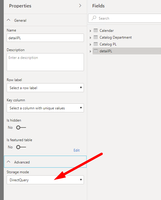
I created PBX file with Data flow data source (direct query mode), but this report don't work in Power bi services
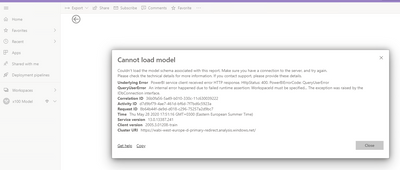
error
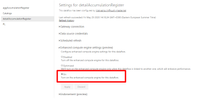
I experienced the same issue and was able to solve this issue by changing the data source privacy level to 'organizational'. Please see the screen shot below.
Hi @Clasteruga, have you been able to solve this issue by now?
I run into the same issue. I have enabled all the required settings, and I have the option to select Direct Query when getting data from a dataflow. Everything is working fine and I am able to publish to the Power BI Server. When I try to open the report in the Power BI Server I got the following error message:
Couldn't load the model schema associated with this report. Make sure you have a connection to the server, and try again.
Please check the technical details for more information. If you contact support, please provide these details.
The datasource of the dataflow is Amazon Redshift. Is it true this isn't possible? Weird, since it works properly in the Power BI Desktop. If so, will this be available in the (hopefullyn near) future?
hi @Clasteruga
What is your datasource for Data flow?
and if you use import model, does it work well?
Regards,
Lin
1. Datasource for Data flow = SQL Server
2. Yes
Hi @Clasteruga,
To get a few things cleared up:
On point 2: have you gone through the documentation and done the following things?
Next to that, there are quite a few limitations right now, are you sure you're not hitting one of them?
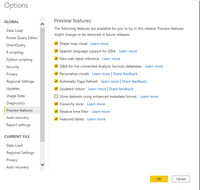
For example: DirectQuery for dataflows does not work with the enhanced metadata preview feature enabled.
1. You're using a dataflow that has DQ to a SQL Server - I'm using dataflow which download data from SQL server by schedule
2. You're consuming that dataflow in PBI Desktop - I created PBX file in DQ mode to dataflow
3. Enable the enhanced compute engine - YES
4. Enable DirectQuery for dataflows - YES
But in PBX file DQ mode for dataflow works fine
Am I doing something wrong? 🤔☹️
Check out the April 2026 Power BI update to learn about new features.
Sign up to receive a private message when registration opens and key events begin.
If you have recently started exploring Fabric, we'd love to hear how it's going. Your feedback can help with product improvements.
| User | Count |
|---|---|
| 10 | |
| 9 | |
| 8 | |
| 8 | |
| 7 |
| User | Count |
|---|---|
| 50 | |
| 27 | |
| 23 | |
| 23 | |
| 22 |