cancel
Showing results for 
Search instead for 
Did you mean: 

The Power BI Data Visualization World Championships is back! Get ahead of the game and start preparing now! Learn more

Reply
TSHECKEL
Advocate II
Advocate II

Data Refreshes and DirectQuery for Power BI datasets and Azure Analysis Services

How does one schedule a refresh for an external dataset within the "DirectQuery for Power BI datasets and Azure Analysis Services" model?


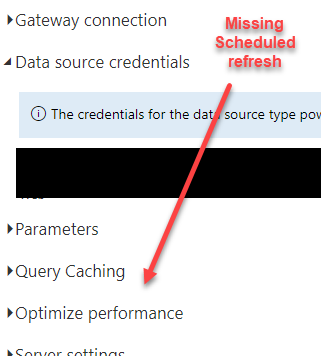
We created a report off of a shared dataset and then added / imported another table. This creates a dataset unique to the shared report wihtin the service. How does one schedule a refresh of that data content? The service settings for this dataset does not have the schedule refresh option present. I also tested a refresh of the core datset and that did not trigger a refresh of shred reports dataset.

1 ACCEPTED SOLUTION

Ahhh... open Optimize Performance. Scheduled Refresh has moved for DQ models in some tenants. See discussion here.


Did I answer your question? Mark my post as a solution!
Did my answers help arrive at a solution? Give it a kudos by clicking the Thumbs Up!

DAX is for Analysis. Power Query is for Data Modeling


Proud to be a Super User!

MCSA: BI Reporting

View solution in original post

6 REPLIES 6
edhans
Super User
Super User

You don't. It is a live connection. When the source dataset refreshes, when you look at the report connected to it, it is up to date. A report connected to a dataset doesn't have its own dataset. It is using the dataset you are connected to. You could think of it as a normal report. You have the report and the dataset. The dataset needs to refresh. The "report" part does not. It is just up to date.

For models with the new composite model (Direct query over AAS/PowerBI) there is a dataset published, but it is a passthrough, or DirectQuery, so it too does not need to refresh.


Did I answer your question? Mark my post as a solution!
Did my answers help arrive at a solution? Give it a kudos by clicking the Thumbs Up!

DAX is for Analysis. Power Query is for Data Modeling


Proud to be a Super User!

MCSA: BI Reporting

Thanks but I'm more so referring to an additional table that is added to the report. So, the report is feeding from a master datset yet we've also added an additional table from an outside source. This table resides in an import mode and sits alongside the direct query tables from the master dataset. The question is how does one update the imported table and data content?

Are you sure that other table is in import mode? It should allow refresh for any tables native/stored in the model.


Did I answer your question? Mark my post as a solution!
Did my answers help arrive at a solution? Give it a kudos by clicking the Thumbs Up!

DAX is for Analysis. Power Query is for Data Modeling


Proud to be a Super User!

MCSA: BI Reporting

TSHECKEL_0-1630690898393.png

TSHECKEL_0-1630691775065.png


Yes, it's residing in an import mode. It doesn't appear that there's a way to schedule a data refresh for this table within the service.  

Ahhh... open Optimize Performance. Scheduled Refresh has moved for DQ models in some tenants. See discussion here.


Did I answer your question? Mark my post as a solution!
Did my answers help arrive at a solution? Give it a kudos by clicking the Thumbs Up!

DAX is for Analysis. Power Query is for Data Modeling


Proud to be a Super User!

MCSA: BI Reporting

Thanks!

Helpful resources

Announcements
Power BI DataViz World Championships

Power BI Dataviz World Championships

The Power BI Data Visualization World Championships is back! Get ahead of the game and start preparing now!

December 2025 Power BI Update Carousel

Power BI Monthly Update - December 2025

Check out the December 2025 Power BI Holiday Recap!

FabCon Atlanta 2026 carousel

FabCon Atlanta 2026

Join us at FabCon Atlanta, March 16-20, for the ultimate Fabric, Power BI, AI and SQL community-led event. Save $200 with code FABCOMM.