cancel
Showing results for 
Search instead for 
Did you mean: 

The Power BI Data Visualization World Championships is back! Get ahead of the game and start preparing now! Learn more

Reply
swarnikasinha
Helper I
Helper I

Data Gateway

Hi All

I am facing difficulties with Refreshing a dataset in Power BI Service. Datasource is Azure sql database I have used import mode. I need to set up refresh. 


Which Datagateway I should Install. VNET,Personal Datagateway or enterprise data gateway.

@Gilbert 

Thanks 

Swarnika

1 ACCEPTED SOLUTION
TomMartens
Super User
Super User

Hey @swarnikasinha ,


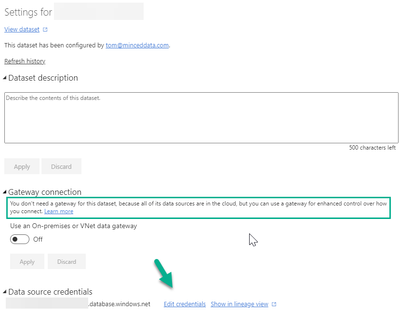
using Azure SQL DB does not require using an on-premises gateway. A gateway is only required when you have to meet specific security requirements.

Can you provide the error message from the refresh history, make sue that you expand the detail hint?

Did you adjust the "Edit credentials" (see the below image) after you published the report to the workspace. This is required as "Publish" will not publish the credentials you are using on Desktop to avoid man-in-the-middle interference.

image.png


Hopefully,  this provides some ideas on of how to tackle your challenge.


Regards,

Tom


Did I answer your question? Mark my post as a solution, this will help others!

Proud to be a Super User!
I accept Kudos 😉
Hamburg, Germany

View solution in original post

2 REPLIES 2
v-yinliw-msft
Community Support
Community Support

Hi @swarnikasinha ,


Regarding your question, first of all, please be clear about your needs:


1.If you only serve yourself and do not need to collaborate with others and share your work, then you can choose a personal gateway;

For more information about how to use the personal gateway, see the following document: Use personal gateways in Power BI - Power BI | Microsoft Docs


2.If you need to put your work in a workspace and collaborate with others, we recommend that you use a standard gateway which you call enterprise gateway,

so that you can set up a gateway cluster and better manage the work that multiple people collaborate on.

For more information about how to install a standard gateway, see the following documentation: Install an on-premises data gateway | Microsoft Docs


After downloading the gateway, you also need to configure scheduled refresh, please refer to the following document on how to configure scheduled refresh: Configure scheduled refresh - Power BI | Microsoft Docs


Best Regards,

Community Support Team _Yinliw

If this post helps, then please consider Accept it as the solution to help the other members find it more quickly.

TomMartens
Super User
Super User

Hey @swarnikasinha ,


using Azure SQL DB does not require using an on-premises gateway. A gateway is only required when you have to meet specific security requirements.

Can you provide the error message from the refresh history, make sue that you expand the detail hint?

Did you adjust the "Edit credentials" (see the below image) after you published the report to the workspace. This is required as "Publish" will not publish the credentials you are using on Desktop to avoid man-in-the-middle interference.

image.png


Hopefully,  this provides some ideas on of how to tackle your challenge.


Regards,

Tom


Did I answer your question? Mark my post as a solution, this will help others!

Proud to be a Super User!
I accept Kudos 😉
Hamburg, Germany

Helpful resources

Announcements
Power BI DataViz World Championships

Power BI Dataviz World Championships

The Power BI Data Visualization World Championships is back! Get ahead of the game and start preparing now!

December 2025 Power BI Update Carousel

Power BI Monthly Update - December 2025

Check out the December 2025 Power BI Holiday Recap!

FabCon Atlanta 2026 carousel

FabCon Atlanta 2026

Join us at FabCon Atlanta, March 16-20, for the ultimate Fabric, Power BI, AI and SQL community-led event. Save $200 with code FABCOMM.