Get Fabric or SQL Certified for Free.
Get certified for free when you join Fabric Data Days 2026 and dive into Fabric, Power BI, SQL, AI, and other essential data skills.
Join now- Power BI forums
- Get Help with Power BI
- Desktop
- Service
- Report Server
- Power Query
- Mobile Apps
- Developer
- DAX Commands and Tips
- Custom Visuals Development Discussion
- Health and Life Sciences
- Power BI Spanish forums
- Translated Spanish Desktop
- Training and Consulting
- Instructor Led Training
- Dashboard in a Day for Women, by Women
- Galleries
- Data Stories Gallery
- Themes Gallery
- Contests Gallery
- QuickViz Gallery
- Quick Measures Gallery
- Visual Calculations Gallery
- Fabric Apps Gallery
- Notebook Gallery
- Translytical Task Flow Gallery
- TMDL Gallery
- R Script Showcase
- Webinars and Video Gallery
- Ideas
- Custom Visuals Ideas (read-only)
- Issues
- Issues
- Events
- Upcoming Events
July 28 - August 9 | Final Round of the Power BI Dataviz World Championships. This is your chance. Learn more
- Power BI forums
- Forums
- Get Help with Power BI
- Service
- Re: Daily Position
- Subscribe to RSS Feed
- Mark Topic as New
- Mark Topic as Read
- Float this Topic for Current User
- Bookmark
- Subscribe
- Printer Friendly Page

- Mark as New
- Bookmark
- Subscribe
- Mute
- Subscribe to RSS Feed
- Permalink
- Report Inappropriate Content
Daily Position
Hello all
I need som help/idea to create a daily position like inventory. Starting from a beggining balance, I have all the entries ( production, purchases, returns) and also all my outputs (shipments, transfers) to get the final balance in the day, that will be used as beggining balance for the next day, thinking in a full month view.
Example:
How can I bring the final position of the last day (850) as a begginning balance of the day 02?
| Day 01 | Day02 | |
| Initial Position | 1000 | 850 |
| Production | 500 | 470 |
| Purchases | 100 | 20 |
| Shipments | -600 | -580 |
| Transfers | -150 | 0 |
| Final Position | 850 | 760 |
Solved! Go to Solution.
- Mark as New
- Bookmark
- Subscribe
- Mute
- Subscribe to RSS Feed
- Permalink
- Report Inappropriate Content
Hi @LuisBassetti,
Please check below sample if it suitable for your requirement.
1. Create a table with begin/end type of each records.
Analysis =
CROSSJOIN (
    DISTINCT (
        SELECTCOLUMNS (
            Sheet1,
            "Code", [Code],
            "Date", [Date],
            "Item", [Item],
            "Local", [Local],
            "Month", [Month]
        )
    ),
    UNION ( ROW ( "Type", "a_Begin" ), ROW ( "Type", "z_End" ) )
)
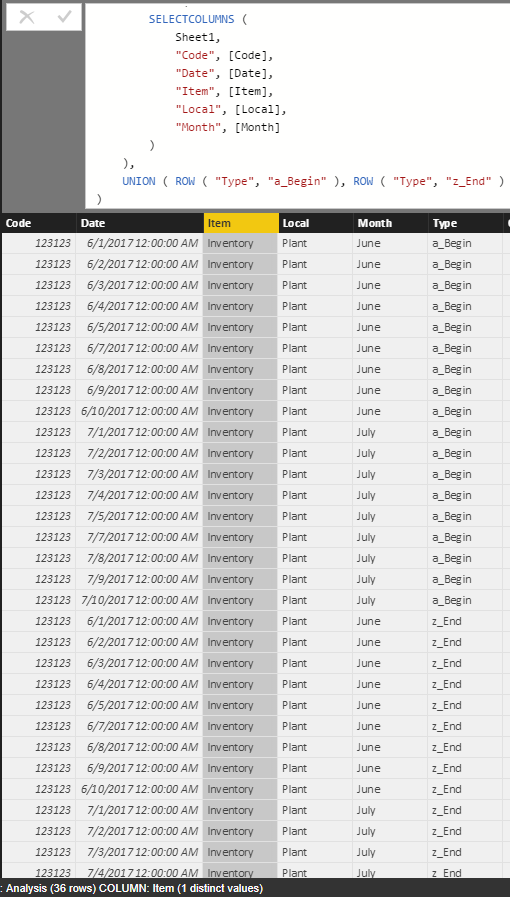
2. Add QTY column to calculate the amount.
QTY =
var temp= LOOKUPVALUE (Sheet2[Qty],Sheet2[Code], [Code], Sheet2[Date], DATE([Date].[Year],[Date].[MonthNo],1) )
RETURN
SWITCH (
        [Type],
        "a_Begin",temp
            + SUMX (
                FILTER (
                    ALL(Sheet1),
                    Sheet1[Code] = EARLIER ( [Code] )
                        && Sheet1[Date] < EARLIER ( [Date] )
                ),
                [QTY]
            ),
        "z_End", temp
            + SUMX (
                FILTER (
                    ALL(Sheet1),
                    Sheet1[Code] = EARLIER ( [Code] )
                        && Sheet1[Date] <= EARLIER ( [Date] )
                ),
                [QTY]
            ),
        0
    )
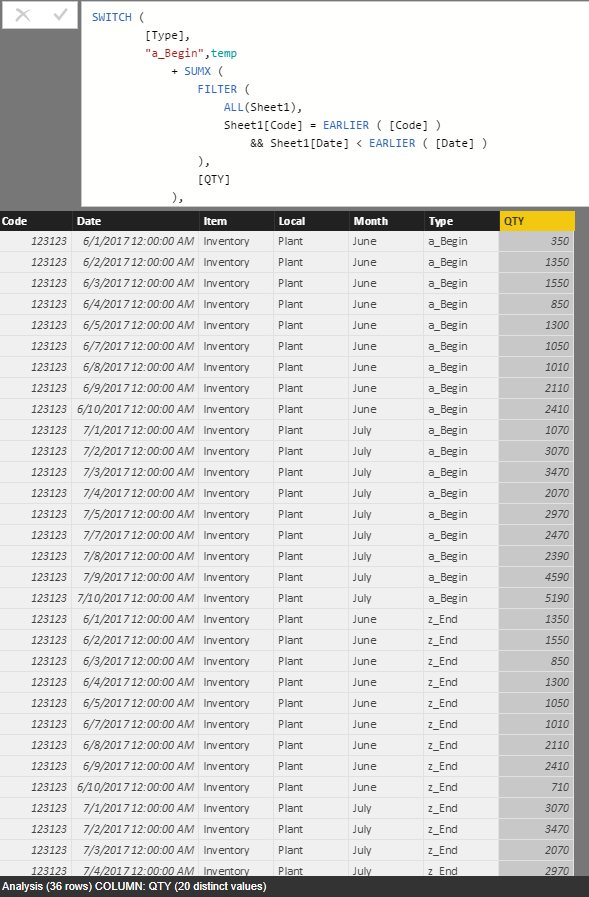
3. Format analysis table and union original table.
Merged = UNION(Sheet1,SELECTCOLUMNS(Analysis,"Code",[Code],"Item",[Item],"Type",[Type],"I/O","","QTY",[Qty],"Local",[Local],"Date",[Date],"Month",[Month]))

4. Use above table to create matrix visual.
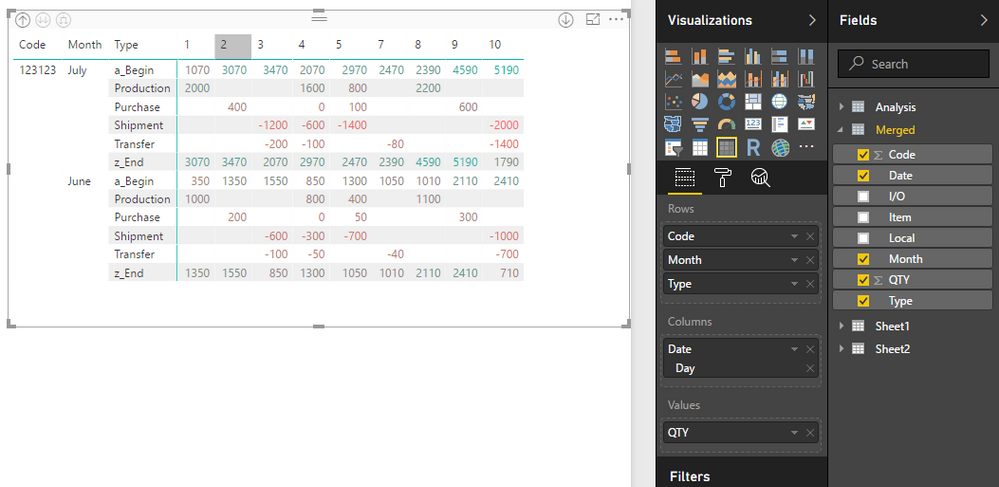
Notice: I have shared the sample file as the attachment.
Regards,
Xiaoxin Sheng

- Mark as New
- Bookmark
- Subscribe
- Mute
- Subscribe to RSS Feed
- Permalink
- Report Inappropriate Content
Hi @LuisBassetti,
If you can please share some sample file to test, it will be help for analysis.
Regards,
Xiaoxin Sheng
- Mark as New
- Bookmark
- Subscribe
- Mute
- Subscribe to RSS Feed
- Permalink
- Report Inappropriate Content
- Mark as New
- Bookmark
- Subscribe
- Mute
- Subscribe to RSS Feed
- Permalink
- Report Inappropriate Content
Hi @LuisBassetti,
Please check below sample if it suitable for your requirement.
1. Create a table with begin/end type of each records.
Analysis =
CROSSJOIN (
    DISTINCT (
        SELECTCOLUMNS (
            Sheet1,
            "Code", [Code],
            "Date", [Date],
            "Item", [Item],
            "Local", [Local],
            "Month", [Month]
        )
    ),
    UNION ( ROW ( "Type", "a_Begin" ), ROW ( "Type", "z_End" ) )
)
2. Add QTY column to calculate the amount.
QTY =
var temp= LOOKUPVALUE (Sheet2[Qty],Sheet2[Code], [Code], Sheet2[Date], DATE([Date].[Year],[Date].[MonthNo],1) )
RETURN
SWITCH (
        [Type],
        "a_Begin",temp
            + SUMX (
                FILTER (
                    ALL(Sheet1),
                    Sheet1[Code] = EARLIER ( [Code] )
                        && Sheet1[Date] < EARLIER ( [Date] )
                ),
                [QTY]
            ),
        "z_End", temp
            + SUMX (
                FILTER (
                    ALL(Sheet1),
                    Sheet1[Code] = EARLIER ( [Code] )
                        && Sheet1[Date] <= EARLIER ( [Date] )
                ),
                [QTY]
            ),
        0
    )
3. Format analysis table and union original table.
Merged = UNION(Sheet1,SELECTCOLUMNS(Analysis,"Code",[Code],"Item",[Item],"Type",[Type],"I/O","","QTY",[Qty],"Local",[Local],"Date",[Date],"Month",[Month]))
4. Use above table to create matrix visual.
Notice: I have shared the sample file as the attachment.
Regards,
Xiaoxin Sheng
- Mark as New
- Bookmark
- Subscribe
- Mute
- Subscribe to RSS Feed
- Permalink
- Report Inappropriate Content
That's exactly what I need! Thank you so much!!
- Mark as New
- Bookmark
- Subscribe
- Mute
- Subscribe to RSS Feed
- Permalink
- Report Inappropriate Content
The easiest way to achieve this would be to have tables set up that hold the information you care about that do particular tasks. For example you might have:
- a table of stock items, with a stock code and the initial stock position.
- a production table with dates, stock codes and quantities created.
- a purchases table with dates, customer codes, stock codes, and quantities
- a shipments table with dates, stock codes, and quantities
- a transfers table with dates, stock codes and quantities
- a date table
- any other reference tables, such as customers etc
Now what you can do is create a measure that is:
Current Position = sum('Stock'[Initial Position') + sum('Production'[Quantity']) + sum('Purchases'[Quantity']) - sum('Production'[Shipments]) - sum('Production'[Transfers'])
Lastly, you can create a table visual with the Stock items as your rows and the Current Position as the values. Using a Date Slicer, you can get your current stock by starting your filter at the first date and the date you are interested in.
Helpful resources

Fabric Community Sticker Challenge - Barcelona 2026
If you love stickers, then you will definitely want to check out our community sticker challenge, Barcelona edition!

Power BI Monthly Update - July 2026
Check out the July 2026 Power BI update to learn about new features.

Power BI DataViz World Championships - June 2026
A new Power BI DataViz World Championship is coming this June! Don't miss out on submitting your entry.

| User | Count |
|---|---|
| 11 | |
| 10 | |
| 9 | |
| 9 | |
| 5 |


