cancel
Showing results for 
Search instead for 
Did you mean: 

The Power BI Data Visualization World Championships is back! It's time to submit your entry. Live now!

Reply
LuisBassetti
New Member

Daily Position

Hello all


I need som help/idea to create a daily position like inventory. Starting from a beggining balance, I have all the entries ( production, purchases, returns) and also all my outputs (shipments, transfers) to get the final balance in the day, that will be used as beggining balance for the next day, thinking in a full month view.


Example:


How can I bring the final position of the last day (850) as a begginning balance of the day 02?

 Day 01Day02
Initial Position1000850
Production500470
Purchases10020
Shipments-600-580
Transfers-1500
Final Position850760


1 ACCEPTED SOLUTION
Anonymous
Not applicable

Hi @LuisBassetti,


Please check below sample if it suitable for your requirement.


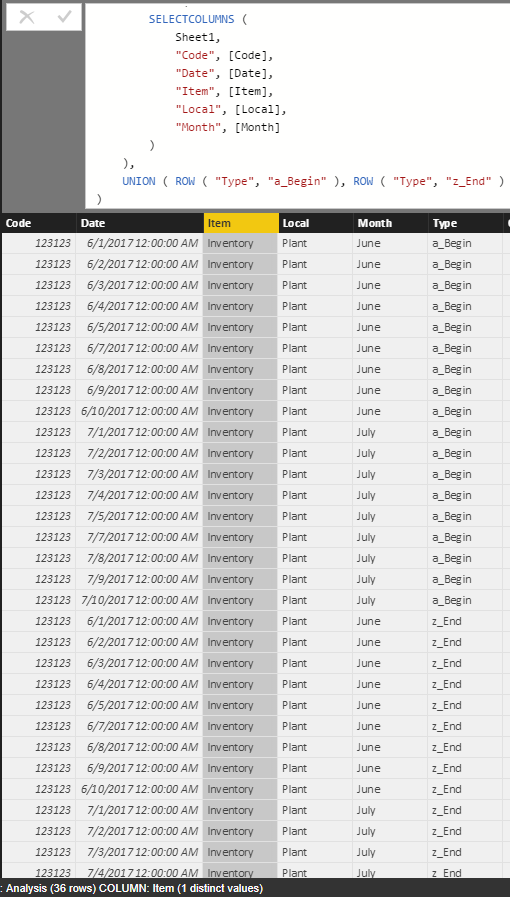
1. Create a table with begin/end type of each records.

Analysis = 
CROSSJOIN (
    DISTINCT (
        SELECTCOLUMNS (
            Sheet1,
            "Code", [Code],
            "Date", [Date],
            "Item", [Item],
            "Local", [Local],
            "Month", [Month]
        )
    ),
    UNION ( ROW ( "Type", "a_Begin" ), ROW ( "Type", "z_End" ) )
)

2.PNG


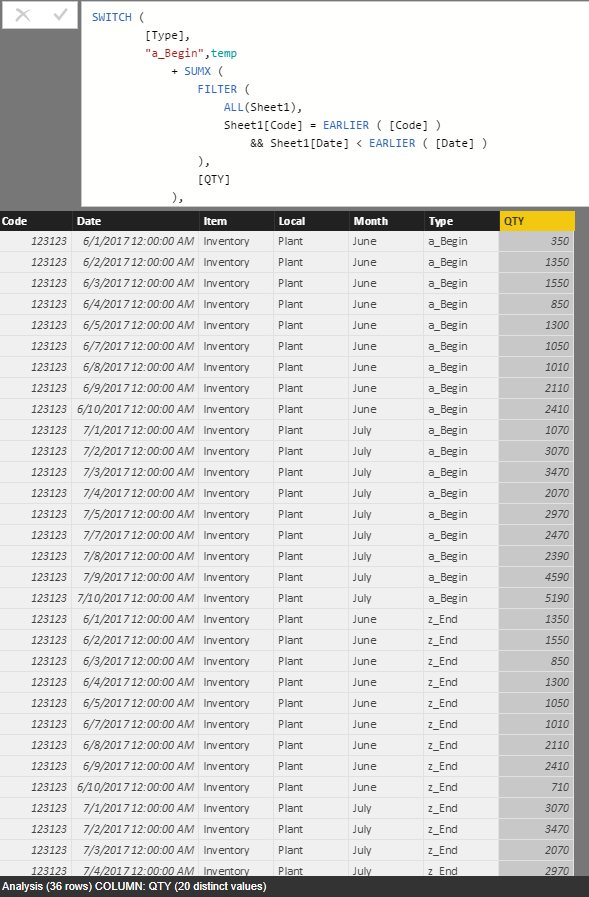
2. Add QTY column to calculate the amount.

QTY = 
var temp= LOOKUPVALUE (Sheet2[Qty],Sheet2[Code], [Code], Sheet2[Date], DATE([Date].[Year],[Date].[MonthNo],1) )
RETURN
SWITCH (
        [Type],
        "a_Begin",temp
            + SUMX (
                FILTER (
                    ALL(Sheet1),
                    Sheet1[Code] = EARLIER ( [Code] )
                        && Sheet1[Date] < EARLIER ( [Date] )
                ),
                [QTY]
            ),
        "z_End", temp 
            + SUMX (
                FILTER (
                    ALL(Sheet1),
                    Sheet1[Code] = EARLIER ( [Code] )
                        && Sheet1[Date] <= EARLIER ( [Date] )
                ),
                [QTY]
            ),
        0
    ) 

3.PNG


3. Format analysis table and union original table.

Merged = UNION(Sheet1,SELECTCOLUMNS(Analysis,"Code",[Code],"Item",[Item],"Type",[Type],"I/O","","QTY",[Qty],"Local",[Local],"Date",[Date],"Month",[Month])) 

4.PNG


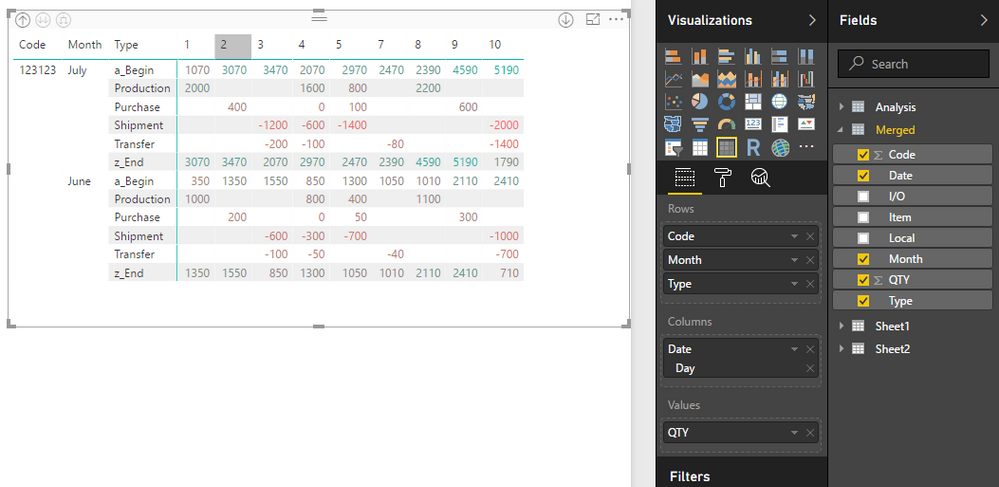
4. Use above table to create matrix visual.

1.PNG


Notice: I have shared the sample file as the attachment.


Regards,

Xiaoxin Sheng

View solution in original post

5 REPLIES 5
Anonymous
Not applicable

Hi @LuisBassetti,


If you can please share some sample file to test, it will be help for analysis.


Regards,

Xiaoxin Sheng

File attached on Google Drive: Table for inventory PBI


due to the character limit.

Anonymous
Not applicable

Hi @LuisBassetti,


Please check below sample if it suitable for your requirement.


1. Create a table with begin/end type of each records.

Analysis = 
CROSSJOIN (
    DISTINCT (
        SELECTCOLUMNS (
            Sheet1,
            "Code", [Code],
            "Date", [Date],
            "Item", [Item],
            "Local", [Local],
            "Month", [Month]
        )
    ),
    UNION ( ROW ( "Type", "a_Begin" ), ROW ( "Type", "z_End" ) )
)

2.PNG


2. Add QTY column to calculate the amount.

QTY = 
var temp= LOOKUPVALUE (Sheet2[Qty],Sheet2[Code], [Code], Sheet2[Date], DATE([Date].[Year],[Date].[MonthNo],1) )
RETURN
SWITCH (
        [Type],
        "a_Begin",temp
            + SUMX (
                FILTER (
                    ALL(Sheet1),
                    Sheet1[Code] = EARLIER ( [Code] )
                        && Sheet1[Date] < EARLIER ( [Date] )
                ),
                [QTY]
            ),
        "z_End", temp 
            + SUMX (
                FILTER (
                    ALL(Sheet1),
                    Sheet1[Code] = EARLIER ( [Code] )
                        && Sheet1[Date] <= EARLIER ( [Date] )
                ),
                [QTY]
            ),
        0
    ) 

3.PNG


3. Format analysis table and union original table.

Merged = UNION(Sheet1,SELECTCOLUMNS(Analysis,"Code",[Code],"Item",[Item],"Type",[Type],"I/O","","QTY",[Qty],"Local",[Local],"Date",[Date],"Month",[Month])) 

4.PNG


4. Use above table to create matrix visual.

1.PNG


Notice: I have shared the sample file as the attachment.


Regards,

Xiaoxin Sheng

That's exactly what I need! Thank you so much!!

Anonymous
Not applicable

The easiest way to achieve this would be to have tables set up that hold the information you care about that do particular tasks.  For example you might have:

  • a table of stock items, with a stock code and the initial stock position. 
  • a production table with dates, stock codes and quantities created.
  • a purchases table with dates, customer codes, stock codes, and quantities
  • a shipments table with dates, stock codes, and quantities
  • a transfers table with dates, stock codes and quantities
  • a date table
  • any other reference tables, such as customers etc


Now what you can do is create a measure that is:

Current Position = sum('Stock'[Initial Position') + sum('Production'[Quantity']) + sum('Purchases'[Quantity']) - sum('Production'[Shipments]) - sum('Production'[Transfers'])

Lastly, you can create a table visual with the Stock items as your rows and the Current Position as the values.  Using a Date Slicer, you can get your current stock by starting your filter at the first date and the date you are interested in.

Helpful resources

Announcements
Power BI DataViz World Championships

Power BI Dataviz World Championships

The Power BI Data Visualization World Championships is back! It's time to submit your entry.

December 2025 Power BI Update Carousel

Power BI Monthly Update - December 2025

Check out the December 2025 Power BI Holiday Recap!

FabCon Atlanta 2026 carousel

FabCon Atlanta 2026

Join us at FabCon Atlanta, March 16-20, for the ultimate Fabric, Power BI, AI and SQL community-led event. Save $200 with code FABCOMM.