cancel
Showing results for 
Search instead for 
Did you mean: 

Data Days is here! Join us now for 60+ days of learning, challenges, and connection. Learn more

Reply
simona0808
Helper I
Helper I

Customize Funnel Visualization

Hello everyone,

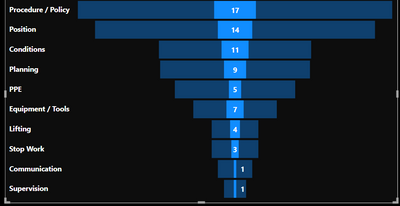
I am trying to customize the funnel visualization I am using for my report. I have a chiclet slicer, based on the selected option the funnel is rendered with the desired data. The problem here is I want to hide the background. Please see the screenshot below. Do you have an idea how I can make the transparent blue to black or hide it? If this is possible using another visualization please share with me. I will be very happy to hear your thoughts.

simona0808_0-1662985156816.png


3 REPLIES 3
ibarrau
Super User
Super User

Hi. You can change the way the filter interaction work. You can make the chiclet make the funnel rebuild instead of highlight from last view. Check this doc out to learn how to do it 🙂
https://docs.microsoft.com/en-us/power-bi/create-reports/service-reports-visual-interactions?tabs=po...

It's just enabling a menu, clicking the chiclet and change a header on the funnel.

I hope that helps,


If this post helps, then please consider Accept it as the solution to help the other members find it more quickly.

Happy to help!

LaDataWeb Blog

Hi, ibarrau,

I am not trying to change how the interaction works. I just want to hide the background color behind the selected value. If that does not make sense please tell me!

Well... As a requirement stand point it doesn't make sense. Changing filter interaction will show the same number without the transparent blue showing the same number. If you want to keep it small like that (for some UX/UI reason) I'm sorry but you can't hide the transparent blue. At least not with the defaul funnel visualization. Maybe you can search in the store if there is a funnel visual with your requirement.

I hope that helps,


If this post helps, then please consider Accept it as the solution to help the other members find it more quickly.

Happy to help!

LaDataWeb Blog

Helpful resources

Announcements
Fabric Data Days is here Carousel

Fabric Data Days 2026

Don't miss out on Data Days, June 15 through August 7. Learn Fabric, Power BI, SQL, AI and more.

May Power BI Update Carousel

Power BI Monthly Update - May 2026

Check out the May 2026 Power BI update to learn about new features.

Power BI DataViz World Championships carousel

Power BI DataViz World Championships - June 2026

A new Power BI DataViz World Championship is coming this June! Don't miss out on submitting your entry.