This time we’re going bigger than ever. Fabric, Power BI, SQL, AI and more. We're covering it all. You won't want to miss it.
Learn moreDid you hear? There's a new SQL AI Developer certification (DP-800). Start preparing now and be one of the first to get certified. Register now
Hello everyone,
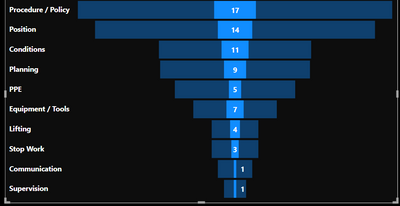
I am trying to customize the funnel visualization I am using for my report. I have a chiclet slicer, based on the selected option the funnel is rendered with the desired data. The problem here is I want to hide the background. Please see the screenshot below. Do you have an idea how I can make the transparent blue to black or hide it? If this is possible using another visualization please share with me. I will be very happy to hear your thoughts.
Hi. You can change the way the filter interaction work. You can make the chiclet make the funnel rebuild instead of highlight from last view. Check this doc out to learn how to do it 🙂
https://docs.microsoft.com/en-us/power-bi/create-reports/service-reports-visual-interactions?tabs=po...
It's just enabling a menu, clicking the chiclet and change a header on the funnel.
I hope that helps,
Happy to help!
Hi, ibarrau,
I am not trying to change how the interaction works. I just want to hide the background color behind the selected value. If that does not make sense please tell me!
Well... As a requirement stand point it doesn't make sense. Changing filter interaction will show the same number without the transparent blue showing the same number. If you want to keep it small like that (for some UX/UI reason) I'm sorry but you can't hide the transparent blue. At least not with the defaul funnel visualization. Maybe you can search in the store if there is a funnel visual with your requirement.
I hope that helps,
Happy to help!
Check out the April 2026 Power BI update to learn about new features.
Sign up to receive a private message when registration opens and key events begin.
If you have recently started exploring Fabric, we'd love to hear how it's going. Your feedback can help with product improvements.
| User | Count |
|---|---|
| 10 | |
| 8 | |
| 7 | |
| 7 | |
| 7 |
| User | Count |
|---|---|
| 49 | |
| 27 | |
| 21 | |
| 20 | |
| 20 |