This time we’re going bigger than ever. Fabric, Power BI, SQL, AI and more. We're covering it all. You won't want to miss it.
Learn moreDid you hear? There's a new SQL AI Developer certification (DP-800). Start preparing now and be one of the first to get certified. Register now
Hello, I have an excel file and the 1st column contains the status of transaction remarked as rejected and accepted, the week numbers of this status and the month of this status.
Can i know is there a right way to create cards represent as the below
Card 1: Count of rejected for week ie: week 25
Card 2: Count of rejected for month ie: Jan
Card 3: Total rejected overall
I've tried but the all cards' data will sync each other in the cards, i set for filter card 1, then card 2 and 3 will follow the setting from card 1.
thanks !
Solved! Go to Solution.
Hi @JimLim,
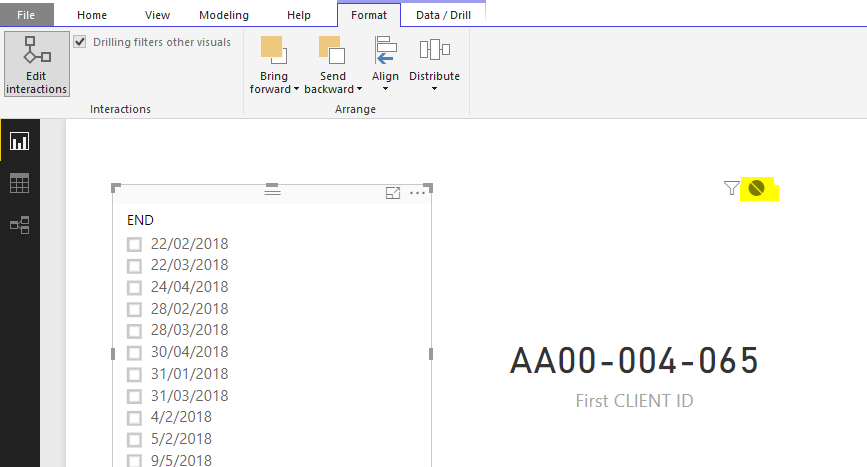
Did you use slicer to filter data for cards? If you only want the slicer selection to affect only card1, you can disable the interactions between slicer and other card visuals by "Edit Interactions".
If you want each card can be filtered by slicer separately, you need to add three slicers to match with each card. And also you need to edit interactions like above.
Regards,
Yuliana Gu
Hi @JimLim,
Did you use slicer to filter data for cards? If you only want the slicer selection to affect only card1, you can disable the interactions between slicer and other card visuals by "Edit Interactions".
If you want each card can be filtered by slicer separately, you need to add three slicers to match with each card. And also you need to edit interactions like above.
Regards,
Yuliana Gu
Hello, I have an excel file and the 1st column contains the status of transaction remarked as rejected and accepted, the week numbers of this status and the month of this status.
Can i know is there a right way to create cards represent as the below
Card 1: Count of rejected for week ie: week 25
Card 2: Count of rejected for month ie: Jan
Card 3: Total rejected overall
I've tried but the all cards' data will sync each other in the cards, i set for filter card 1, then card 2 and 3 will follow the setting from card 1.
thanks !
I don't really understand your question.
Can you please upload the pbix file and/or the excel sheet ? If you don't want to upload the information, you can upload it with sample data.
Thanks.
Check out the April 2026 Power BI update to learn about new features.
Sign up to receive a private message when registration opens and key events begin.
If you have recently started exploring Fabric, we'd love to hear how it's going. Your feedback can help with product improvements.
| User | Count |
|---|---|
| 10 | |
| 8 | |
| 7 | |
| 7 | |
| 7 |
| User | Count |
|---|---|
| 49 | |
| 27 | |
| 21 | |
| 20 | |
| 20 |