cancel
Showing results for 
Search instead for 
Did you mean: 

The Power BI Data Visualization World Championships is back! Get ahead of the game and start preparing now! Learn more

Reply
JimLim
New Member

Create multi cards

Hello, I have an excel file and the 1st column contains the status of transaction remarked as rejected and accepted, the week numbers of this status and the month of this status.


Can i know is there a right way to create cards represent as the below

Card 1: Count of rejected for week ie: week 25

Card 2: Count of rejected for month ie: Jan

Card 3: Total rejected overall


I've tried but the all cards' data will sync each other in the cards, i set for filter card 1, then card 2 and 3 will follow the setting from card 1.


thanks !

1 ACCEPTED SOLUTION
v-yulgu-msft
Microsoft Employee
Microsoft Employee

Hi @JimLim,


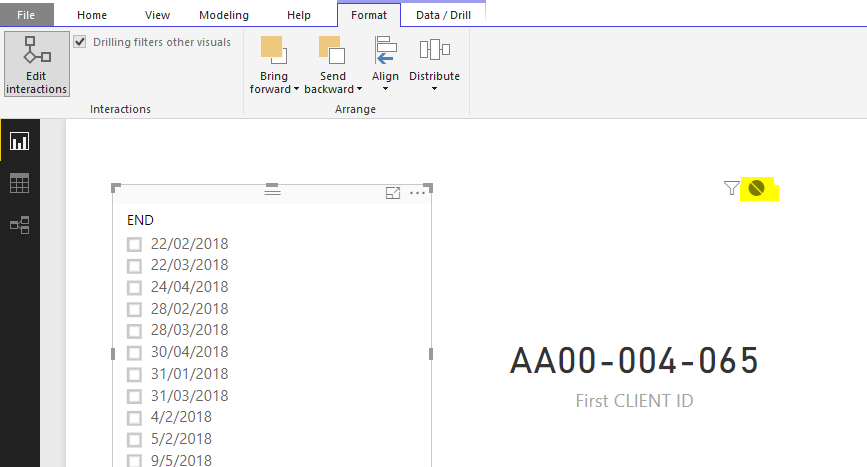
Did you use slicer to filter data for cards? If you only want the slicer selection to affect only card1, you can disable the interactions between slicer and other card visuals by "Edit Interactions".

1.PNG


If you want each card can be filtered by slicer separately, you need to add three slicers to match with each card. And also you need to edit interactions like above.


Regards,

Yuliana Gu

Community Support Team _ Yuliana Gu
If this post helps, then please consider Accept it as the solution to help the other members find it more quickly.

View solution in original post

3 REPLIES 3
v-yulgu-msft
Microsoft Employee
Microsoft Employee

Hi @JimLim,


Did you use slicer to filter data for cards? If you only want the slicer selection to affect only card1, you can disable the interactions between slicer and other card visuals by "Edit Interactions".

1.PNG


If you want each card can be filtered by slicer separately, you need to add three slicers to match with each card. And also you need to edit interactions like above.


Regards,

Yuliana Gu

Community Support Team _ Yuliana Gu
If this post helps, then please consider Accept it as the solution to help the other members find it more quickly.
JimLim
New Member

Hello, I have an excel file and the 1st column contains the status of transaction remarked as rejected and accepted, the week numbers of this status and the month of this status.


Can i know is there a right way to create cards represent as the below

Card 1: Count of rejected for week ie: week 25

Card 2: Count of rejected for month ie: Jan

Card 3: Total rejected overall


I've tried but the all cards' data will sync each other in the cards, i set for filter card 1, then card 2 and 3 will follow the setting from card 1.


thanks !

luxpbi
Helper V
Helper V

I don't really understand your question. 


Can you please upload the pbix file and/or the excel sheet ? If you don't want to upload the information, you can upload it with sample data. 


Thanks.

Helpful resources

Announcements
Power BI DataViz World Championships

Power BI Dataviz World Championships

The Power BI Data Visualization World Championships is back! Get ahead of the game and start preparing now!

December 2025 Power BI Update Carousel

Power BI Monthly Update - December 2025

Check out the December 2025 Power BI Holiday Recap!

FabCon Atlanta 2026 carousel

FabCon Atlanta 2026

Join us at FabCon Atlanta, March 16-20, for the ultimate Fabric, Power BI, AI and SQL community-led event. Save $200 with code FABCOMM.