Join us at FabCon Atlanta from March 16 - 20, 2026, for the ultimate Fabric, Power BI, AI and SQL community-led event. Save $200 with code FABCOMM.
Register now!The Power BI Data Visualization World Championships is back! Get ahead of the game and start preparing now! Learn more
i have Premium Per User License. when i tried Copilot trail i got this error message. already my admin enabled tenant and copilot option in admin portal. Copilot isn't available in this report. The workspace where this report is saved isn't compatible with Copilot. Kindly suggest it is working in Premium Per User License or not.
Solved! Go to Solution.
Hi @satheyaraaj ,
1. In Power BI service, the workspace must be running on F64 or premium capacity to access Copilot of Power BI service. And requires read or write access to the workspace on F64 or Premium capacity. In Power BI Desktop, you need write permissions to the workspace on F64 or Power BI Premium in the Power BI service where you plan to publish the report. For detailed information about copilot requirements, please refer to the document: Overview of Copilot for Power BI (preview) - Power BI | Microsoft Learn. For more information about workspace permissions, refer to the documentation: Roles in workspaces in Power BI - Power BI | Microsoft Learn.
So it is not enough that you have a PPU license, you must have premium capacity to access Copilot.
2. For more information about PPU and Premium capacity, please refer to the document: Power BI Premium Per User - Power BI | Microsoft Learn.
If your Current Period does not refer to this, please clarify in a follow-up reply.
Best Regards,
Clara Gong
If this post helps, then please consider Accept it as the solution to help the other members find it more quickly.
a PPU workspace is that F64 or not?
Hi @annemievandijck ,
F64 capacity needs to be purchased separately. For details, please refer to the documentation:Microsoft Fabric concepts - Microsoft Fabric | Microsoft Learn.
Hi @satheyaraaj ,
1. In Power BI service, the workspace must be running on F64 or premium capacity to access Copilot of Power BI service. And requires read or write access to the workspace on F64 or Premium capacity. In Power BI Desktop, you need write permissions to the workspace on F64 or Power BI Premium in the Power BI service where you plan to publish the report. For detailed information about copilot requirements, please refer to the document: Overview of Copilot for Power BI (preview) - Power BI | Microsoft Learn. For more information about workspace permissions, refer to the documentation: Roles in workspaces in Power BI - Power BI | Microsoft Learn.
So it is not enough that you have a PPU license, you must have premium capacity to access Copilot.
2. For more information about PPU and Premium capacity, please refer to the document: Power BI Premium Per User - Power BI | Microsoft Learn.
If your Current Period does not refer to this, please clarify in a follow-up reply.
Best Regards,
Clara Gong
If this post helps, then please consider Accept it as the solution to help the other members find it more quickly.
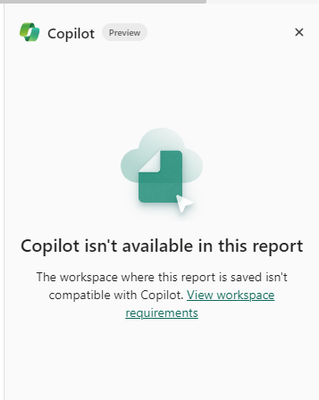
Its not working with Fabric Trial.
Does it work with Fabric trial capacity 64 region south east asia
The Power BI Data Visualization World Championships is back! Get ahead of the game and start preparing now!