Join us in Barcelona for FabCon and SQLCon, September 28 - October 1, 2026.
This is best Fabric, Power BI, SQL and AI community event. How do we know? The last event sold out! Save €200 with code FABCMTY200.
Register now- Power BI forums
- Get Help with Power BI
- Desktop
- Service
- Report Server
- Power Query
- Mobile Apps
- Developer
- DAX Commands and Tips
- Custom Visuals Development Discussion
- Health and Life Sciences
- Power BI Spanish forums
- Translated Spanish Desktop
- Training and Consulting
- Instructor Led Training
- Dashboard in a Day for Women, by Women
- Galleries
- Data Stories Gallery
- Themes Gallery
- Contests Gallery
- QuickViz Gallery
- Quick Measures Gallery
- Visual Calculations Gallery
- Fabric Apps Gallery
- Notebook Gallery
- Translytical Task Flow Gallery
- TMDL Gallery
- R Script Showcase
- Webinars and Video Gallery
- Ideas
- Custom Visuals Ideas (read-only)
- Issues
- Issues
- Events
- Upcoming Events
July 28 - August 9 | Final Round of the Power BI Dataviz World Championships. This is your chance. Learn more
- Power BI forums
- Forums
- Get Help with Power BI
- Service
- Re: Connecting to Azure SQL Database via Dataflows...
- Subscribe to RSS Feed
- Mark Topic as New
- Mark Topic as Read
- Float this Topic for Current User
- Bookmark
- Subscribe
- Printer Friendly Page


- Mark as New
- Bookmark
- Subscribe
- Mute
- Subscribe to RSS Feed
- Permalink
- Report Inappropriate Content
Connecting to Azure SQL Database via Dataflows - authentication not working.
We have an Azure SQL Database to connect to.
- I can connect via SQL Server Management Studio fine: Authentication = Azure Active Directory -Universal with MFA
- I can connect via Power BI Desktop fine: Authentication = Microsoft Account
- I can't connect when using Dataflows. It gives 2 authentication options. Neither work.
- Basic - returns Invalid credentials.
- Or, if I select our local Gateway - Windows - also returns Invalid credentials.
Any insight?
I think, maybe I need a Microsoft Account option for authentication (but that doesn't seem to be available in Dataflows?) or to setup some junk-level non-MFA login in the Azure SQL Database itself? Not really sure.
Solved! Go to Solution.
- Mark as New
- Bookmark
- Subscribe
- Mute
- Subscribe to RSS Feed
- Permalink
- Report Inappropriate Content
Go it, so the issue was:
I was using my own login for authentication in Dataflows - but, my login used Azure Active Directory for authenticaion, and Azure SQL Database doesn't support Azure Active Directory authentication.
Solution: Setup a new SQL Server user in Azure SQL Database, and connect via that login, using the 'Basic' Authentication option in Power Query.


- Mark as New
- Bookmark
- Subscribe
- Mute
- Subscribe to RSS Feed
- Permalink
- Report Inappropriate Content
Hi @mmace1 ,
Please check if you ensure firewall rules for the database are configured to "Allow access to Azure services".

Best Regards,
Icey
If this post helps, then please consider Accept it as the solution to help the other members find it more quickly.
- Mark as New
- Bookmark
- Subscribe
- Mute
- Subscribe to RSS Feed
- Permalink
- Report Inappropriate Content
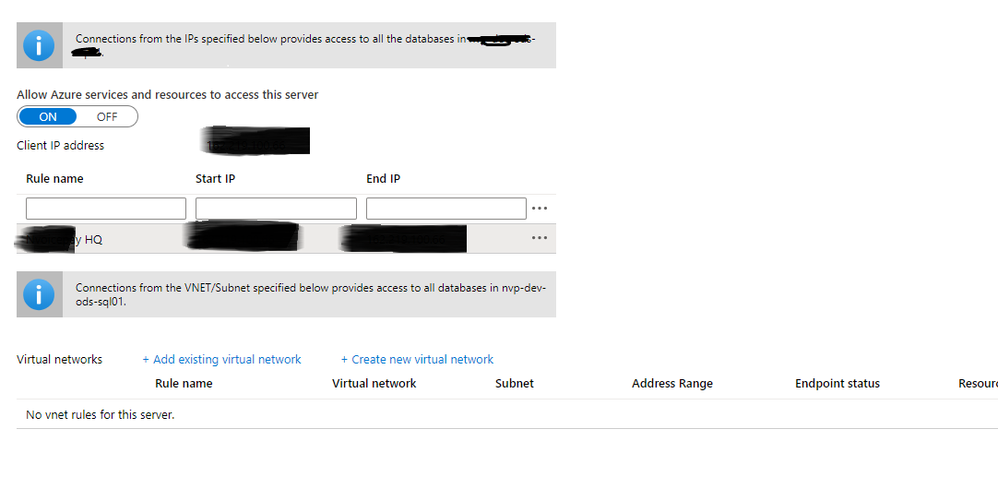
Thanks. We did have [Allow Access to Azure Services] on already.
Do we need to specify the IP range that Dataflows uses? (Though isn't it completley dynamic / unpredictable?)
- Mark as New
- Bookmark
- Subscribe
- Mute
- Subscribe to RSS Feed
- Permalink
- Report Inappropriate Content
Hi @mmace1 ,
Just try it. You can refer to this document: https://docs.microsoft.com/en-us/azure/sql-database/sql-database-server-level-firewall-rule.
Best Regards,
Icey
If this post helps, then please consider Accept it as the solution to help the other members find it more quickly.
- Mark as New
- Bookmark
- Subscribe
- Mute
- Subscribe to RSS Feed
- Permalink
- Report Inappropriate Content
Try what, adding the Dataflows IP address as a server-level firewall rule in the Azure SQL Database?
Isn't the Dataflows IP address dynamic?
- Mark as New
- Bookmark
- Subscribe
- Mute
- Subscribe to RSS Feed
- Permalink
- Report Inappropriate Content
Hi @mmace1 ,
You can try to enable the access of Power BI not dataflow to Azure SQL via whitelisting the IP addresses, for your data region, in your firewall. However, the IP range of Power BI server is updated weekly. Moreover, it could be different each time within each region. So, you have to monitor and update the IP range on time to ensure Power BI can always fetch data successfully.
Reference: https://docs.microsoft.com/en-us/data-integration/gateway/service-gateway-communication#ports.
If the issue is still there and you are a pro user, I suggest you to create a support ticket to get further help.

Best Regards,
Icey
If this post helps, then please consider Accept it as the solution to help the other members find it more quickly.
- Mark as New
- Bookmark
- Subscribe
- Mute
- Subscribe to RSS Feed
- Permalink
- Report Inappropriate Content
Thanks for confirming the IP addresses vary. That cofirm it woudln't be (to my way of thinking) a very solid solution then.
It seems as if Azure SQL Database doesn't support Azure Active Directory. At least, Azure SQL Datawarehouse doesn't, and I'm guessing maybe SQL Database is the same.
https://docs.microsoft.com/en-us/power-bi/service-dataflows-create-use
I'm going to try to get someone with the necessary permissions, to setup a SQL Server login, and see if that works for Dataflows.
- Mark as New
- Bookmark
- Subscribe
- Mute
- Subscribe to RSS Feed
- Permalink
- Report Inappropriate Content
Hi @mmace1 ,
Oh, I didn't notice this. It turned out that I was in the wrong direction. Anyway, wish you success.
Best Regards,
Icey
- Mark as New
- Bookmark
- Subscribe
- Mute
- Subscribe to RSS Feed
- Permalink
- Report Inappropriate Content
Go it, so the issue was:
I was using my own login for authentication in Dataflows - but, my login used Azure Active Directory for authenticaion, and Azure SQL Database doesn't support Azure Active Directory authentication.
Solution: Setup a new SQL Server user in Azure SQL Database, and connect via that login, using the 'Basic' Authentication option in Power Query.

Helpful resources

FabCon & SQLCon – Barcelona 2026
Join us in Barcelona for FabCon and SQLCon, the Fabric, Power BI, SQL, and AI community event. Save €200 with code FABCMTY200.

Fabric Community Sticker Challenge - Barcelona 2026
If you love stickers, then you will definitely want to check out our community sticker challenge, Barcelona edition!

Power BI Monthly Update - July 2026
Check out the July 2026 Power BI update to learn about new features.

Power BI DataViz World Championships - June 2026
A new Power BI DataViz World Championship is coming this June! Don't miss out on submitting your entry.

| User | Count |
|---|---|
| 11 | |
| 10 | |
| 9 | |
| 5 | |
| 5 |


