cancel
Showing results for 
Search instead for 
Did you mean: 

The Power BI Data Visualization World Championships is back! Get ahead of the game and start preparing now! Learn more

Reply
jhlim
Regular Visitor

Configure SharePoint Database Refresh in Microsoft Team

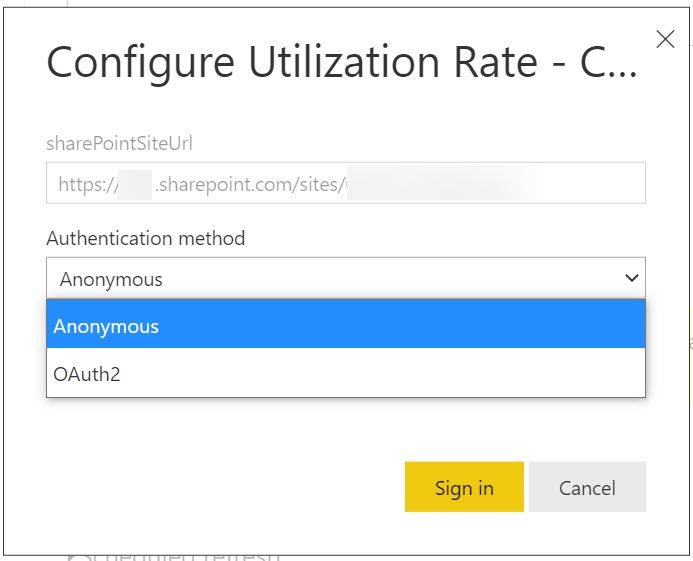
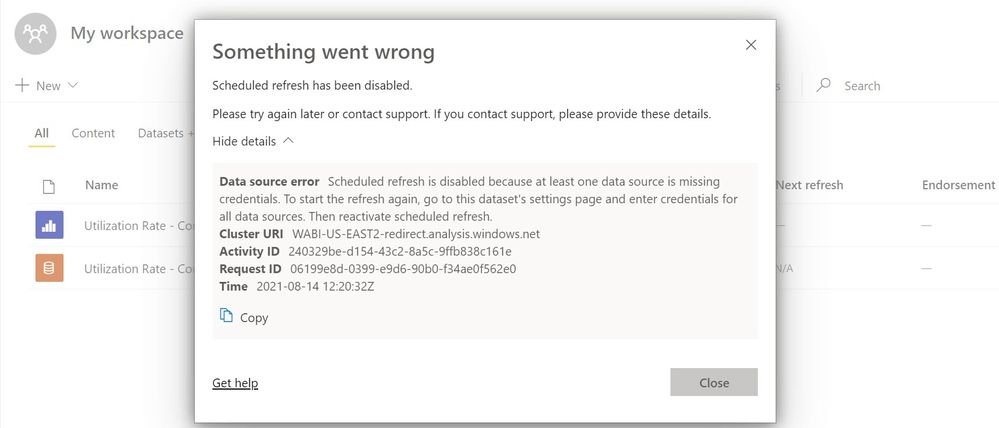
My PowerBi Desktop had updated to version August 2021 and I had published the completed dashboard into my Microsoft Team's workspace. I went to the setting to configure database refresh, there are only Anonymous and OAuth2 authentication methods available. I tried all the authentication methods, but none of it working.


I was still unable to refresh the database from Microsoft Team via Sharepoint List. May I know how I can refresh successfully thru Microsoft Team or is there any alternative resolution?

Thank you.


2021-08-14_20-20-57.jpg2021-08-14_20-14-41.jpg

1 ACCEPTED SOLUTION
jhlim
Regular Visitor

Hi All,


Thank you all for the advice. I have found out the root cause. When I trying to edit credentials from Microsoft Team's workspace, the sign-in window will not trigger.

To solve this, I log on to Power BI Website and edit credentials from there. The sign-in window will trigger and I was able to select the credential accordingly.

Thanks again for the helps.
2021-08-18_15-28-40.jpg


View solution in original post

3 REPLIES 3
jhlim
Regular Visitor

Hi All,


Thank you all for the advice. I have found out the root cause. When I trying to edit credentials from Microsoft Team's workspace, the sign-in window will not trigger.

To solve this, I log on to Power BI Website and edit credentials from there. The sign-in window will trigger and I was able to select the credential accordingly.

Thanks again for the helps.
2021-08-18_15-28-40.jpg


Anonymous
Not applicable

Hi  @jhlim ,

According to your error, it seems that you cannot provide all the credentials for datsource. Please check and provide the correct credentials.

1. In power Bi services, enter the report's workspace, find the gear button in the top right corner, select the settings in it, and find the dataset. A list will appear in the list, which contains the datasets of the reports that you have encountered problems
2. By clicking the data set, find the part of data source credentials on the right, check whether the data source fails, and a circle will be displayed


This is the related document, you can view this content:

https://community.powerbi.com/t5/Service/PowerBI-not-updating-in-PBI-Online/td-p/408156

https://docs.microsoft.com/en-us/power-bi/connect-data/service-gateway-enterprise-manage-scheduled-r...

https://community.powerbi.com/t5/Service/PBI-Service-Refresh/td-p/1649488


Best Regards,

Liu Yang

If this post helps, then please consider Accept it as the solution to help the other members find it more quickly.

arvindsingh802
Super User
Super User

Please use SharePoint Online List as a source and then develope your report


in Authentication please use OAuth2 authentication.


If this post helps, then please consider Accept it as the solution, Appreciate your Kudos!


If this post helps, then please consider Accept it as the solution, Appreciate your Kudos!!
Proud to be a Super User!!

Helpful resources

Announcements
Power BI DataViz World Championships

Power BI Dataviz World Championships

The Power BI Data Visualization World Championships is back! Get ahead of the game and start preparing now!

December 2025 Power BI Update Carousel

Power BI Monthly Update - December 2025

Check out the December 2025 Power BI Holiday Recap!

FabCon Atlanta 2026 carousel

FabCon Atlanta 2026

Join us at FabCon Atlanta, March 16-20, for the ultimate Fabric, Power BI, AI and SQL community-led event. Save $200 with code FABCOMM.