cancel
Showing results for 
Search instead for 
Did you mean: 

Did you hear? There's a new SQL AI Developer certification (DP-800). Start preparing now and be one of the first to get certified. Register now

Reply
Anonymous
Not applicable

Conditional Formatting one cell based on another cell

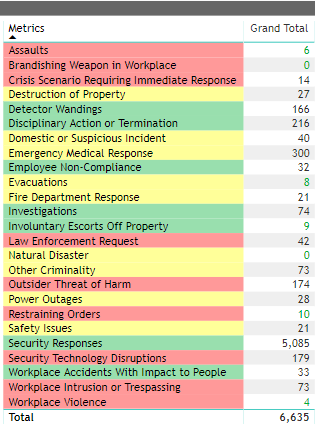
dashboard.PNGHello all!


Each of the fields in the 'Metrics' column has a respective range for acceptable and unacceptable values (which will be reflected in the adjacent column labeled 'Grand Totals')


I would like to apply conditional formatting to each cell in Grand Total based on the range respective to the specific 'Metric' in question. 


For example: 5 'Assault' incidents may be considered high (that value in the 'Grand Total' column would be red). This same number of incidents may be considered a low figure for 'Detector Wandings' (that value would then be green). 


Any help or feedback is greatly appreciated! 🙂 

1 ACCEPTED SOLUTION
Anonymous
Not applicable

HI @Anonymous ,

Please take a look at following blogs to know more about switch functions:

DAX – Making the “Case” for SWITCH()

Optimizing IF and SWITCH expressions using variables

Please understand that these links are provided with no warranties or guarantees of content changes, and confers no rights.

Regards,

Xiaoxin Sheng

View solution in original post

3 REPLIES 3
Anonymous
Not applicable

Hi @Anonymous ,

You can consider to write a measure with switch function to check current metric and return correspond color, then enable conditional formatting background color based on measure fields value.

Conditional formatting in tables

After these, you can enable conditional formatting on second field with 'rule' mode based on its value.

Regards,

Xiaoxin Sheng

Anonymous
Not applicable


@Anonymous wrote:

Hi @Anonymous ,

You can consider to write a measure with switch function to check current metric and return correspond color, then enable conditional formatting background color based on measure fields value.

Conditional formatting in tables

After these, you can enable conditional formatting on second field with 'rule' mode based on its value.

Regards,

Xiaoxin Sheng


Thank you for your response 🙂 I am a total newbie (introduced to Power BI less than a month ago). Is there a tutorial available that you recommend explaining the execution of this Switch function? 

Anonymous
Not applicable

HI @Anonymous ,

Please take a look at following blogs to know more about switch functions:

DAX – Making the “Case” for SWITCH()

Optimizing IF and SWITCH expressions using variables

Please understand that these links are provided with no warranties or guarantees of content changes, and confers no rights.

Regards,

Xiaoxin Sheng

Helpful resources

Announcements
April Power BI Update Carousel

Power BI Monthly Update - April 2026

Check out the April 2026 Power BI update to learn about new features.

Fabric SQL PBI Data Days

Data Days 2026 coming soon!

Sign up to receive a private message when registration opens and key events begin.

New to Fabric survey Carousel

New to Fabric Survey

If you have recently started exploring Fabric, we'd love to hear how it's going. Your feedback can help with product improvements.

Power BI DataViz World Championships carousel

Power BI DataViz World Championships - June 2026

A new Power BI DataViz World Championship is coming this June! Don't miss out on submitting your entry.