cancel
Showing results for 
Search instead for 
Did you mean: 

The Power BI Data Visualization World Championships is back! Get ahead of the game and start preparing now! Learn more

Reply
Anonymous
Not applicable

Changing data source on Service

Hi All,

This coming from a 5 Years Tableau user and i am new to PBI.

I recently developed a dashboard on PBI and deployed it on Service. The data source used is an excel file which is located on my local system (Laptop). This file will be updated daily with data so what i am thinking is that instead of me referhing the datasource daily i should schedule a refresh, for that i would upload the file to Onedrive for Business or sharepoint. So instead of refering to my laptop location for the refresh i should go to Onedrive for Business or sharepoint to refresh the datasource.

How can i change the location of the file from my local machine to Onedrive or Sharepoint ?

2 ACCEPTED SOLUTIONS
v-jiascu-msft
Microsoft Employee
Microsoft Employee

Hi @Anonymous,


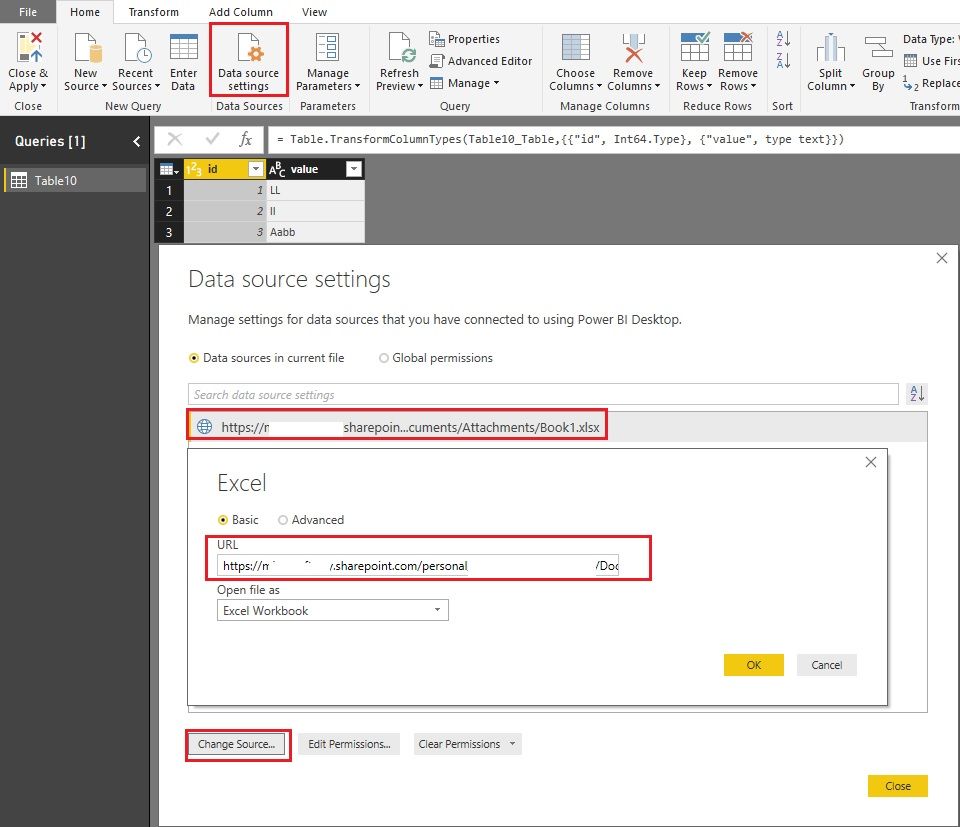
If you created the report in Power BI Desktop, you can change the data source in Desktop and then republish it to Service. Please reference: powerbi-desktop-use-onedrive-business-links.Changing data source on Service.jpg


If you created the report in Power BI Service, I'm afraid it can't be changed by now. Please vote or create an idea here: updatable-pbix-xlsx-datasets


Best Regards!

Dale

Community Support Team _ Dale
If this post helps, then please consider Accept it as the solution to help the other members find it more quickly.

View solution in original post

Anonymous
Not applicable

@v-jiascu-msft if the data is same in both data sources and i replace the data source will the model keep the changes that i made for e.g. Measure, columns i created or the data types of columns i changed ?


Thanks.

View solution in original post

4 REPLIES 4
Anonymous
Not applicable

Hi All,

This coming from a 5 Years Tableau user and i am new to PBI.

I recently developed a dashboard on PBI and deployed it on Service. The data source used is an excel file which is located on my local system (Laptop). This file will be updated daily with data so what i am thinking is that instead of me referhing the datasource daily i should schedule a refresh, for that i would upload the file to Onedrive for Business or sharepoint. So instead of refering to my laptop location for the refresh i should go to Onedrive for Business or sharepoint to refresh the datasource.

How can this be done ?

v-jiascu-msft
Microsoft Employee
Microsoft Employee

Hi @Anonymous,


If you created the report in Power BI Desktop, you can change the data source in Desktop and then republish it to Service. Please reference: powerbi-desktop-use-onedrive-business-links.Changing data source on Service.jpg


If you created the report in Power BI Service, I'm afraid it can't be changed by now. Please vote or create an idea here: updatable-pbix-xlsx-datasets


Best Regards!

Dale

Community Support Team _ Dale
If this post helps, then please consider Accept it as the solution to help the other members find it more quickly.
Anonymous
Not applicable

@v-jiascu-msft if the data is same in both data sources and i replace the data source will the model keep the changes that i made for e.g. Measure, columns i created or the data types of columns i changed ?


Thanks.

Hi @Anonymous,


Yes, the whole model won't be changed. It just retrieves data from a new source. 


Best Regards!

Dale

Community Support Team _ Dale
If this post helps, then please consider Accept it as the solution to help the other members find it more quickly.

Helpful resources

Announcements
Power BI DataViz World Championships

Power BI Dataviz World Championships

The Power BI Data Visualization World Championships is back! Get ahead of the game and start preparing now!

December 2025 Power BI Update Carousel

Power BI Monthly Update - December 2025

Check out the December 2025 Power BI Holiday Recap!

FabCon Atlanta 2026 carousel

FabCon Atlanta 2026

Join us at FabCon Atlanta, March 16-20, for the ultimate Fabric, Power BI, AI and SQL community-led event. Save $200 with code FABCOMM.