cancel
Showing results for 
Search instead for 
Did you mean: 

The Power BI Data Visualization World Championships is back! Get ahead of the game and start preparing now! Learn more

Reply
Anonymous
Not applicable

Changing Analysis server

Hi, 


We are in the process of changing our Analysis server to a new dedicated Analysis server with a new name etc.  I can create an new data source connection to a copy of a tabular model on the new server, but how do I change the datasets in PowerBI Service to use the new data source connection pointing at the new Analysis server? 


I know, I can always download the .pbix file to desktop and change the data source and upload it again, but that's a very cumbersome process to do for each report. So if anyone knows a easier solution to point a data set to a new data source connection it would be much obliged.    


Regards

Jakob Wetterslev

1 ACCEPTED SOLUTION
v-deddai1-msft
Community Support
Community Support

Hi @Anonymous ,


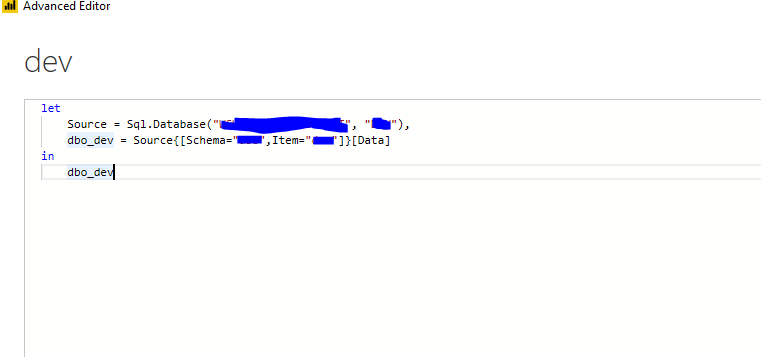
Based on my test, there is There is no easy way because you need to change the connection string of the datasource in the advanced editor. In service, you cannot modify it. You can only modify it in desktop.

Untitled picture1.png

Best Regards,

Dedmon Dai

View solution in original post

3 REPLIES 3
v-deddai1-msft
Community Support
Community Support

Hi @Anonymous ,


Based on my test, there is There is no easy way because you need to change the connection string of the datasource in the advanced editor. In service, you cannot modify it. You can only modify it in desktop.

Untitled picture1.png

Best Regards,

Dedmon Dai

Anonymous
Not applicable

Thanks for your reply Dedmon, 


I feared you answar, but apparently there is no way out of it - it's the hard way down to desktop and up again for each report 😞


Regards

Jakob


Unfortunately this will be a lot of work.

Helpful resources

Announcements
Power BI DataViz World Championships

Power BI Dataviz World Championships

The Power BI Data Visualization World Championships is back! Get ahead of the game and start preparing now!

December 2025 Power BI Update Carousel

Power BI Monthly Update - December 2025

Check out the December 2025 Power BI Holiday Recap!

FabCon Atlanta 2026 carousel

FabCon Atlanta 2026

Join us at FabCon Atlanta, March 16-20, for the ultimate Fabric, Power BI, AI and SQL community-led event. Save $200 with code FABCOMM.