
cancel
Showing results for 
Search instead for 
Did you mean: 

Join the FabCon + SQLCon recap series. Up next: Power BI, Real-Time Intelligence, IQ and AI, and Data Factory take center stage. All sessions are available on-demand after the live show. Register now

Reply
Anonymous
Not applicable

Cards With RLS Blank in Dashboard

Hi all,


I'm running into an issue where values reported in a dashboard do not match the values in its source report for other users' accounts. In this case, I have RLS to restrict the dataset and have published it in an app. 


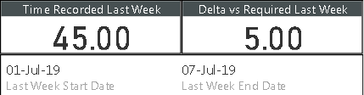
This first image is from the page in the report. For this user, you can see that dates and values are recorded.

ReportValues.PNG

When I look at a dashboard where I've pinned those same card visuals from the report, you can see that the values all appear blank. The Current Account card is a measure that returns userprincipalname(), and that does appear correctly.

DashboardValues1.PNG


I do not see this issue with my account, although from searching this forum I've seen that it's possible for the owner/admin to see different data than other users. I've configured RLS security settings applied with a distro list which includes myself and the user I'm testing with so there shouldn't be a difference in how they're applied.


Any ideas what the issue might be?


Thanks in advance.

1 ACCEPTED SOLUTION
Anonymous
Not applicable

I've deleted my report and the dataset, then published it again which appears to have fixed the issues. Looks like that's the easiest way to fix this problem rather than trying to fix the published version.

View solution in original post

3 REPLIES 3
Anonymous
Not applicable

Just found this as a potential solution (setting workspace to view-only for members). I'll test this out in the morning to see if it fixes the issue. https://stackoverflow.com/questions/50021342/row-level-security-not-working-in-power-bi-with-groups
Anonymous
Not applicable

Looks like that didn't fix the issue. Any other ideas?

Anonymous
Not applicable

I've deleted my report and the dataset, then published it again which appears to have fixed the issues. Looks like that's the easiest way to fix this problem rather than trying to fix the published version.

Helpful resources

Announcements
April Power BI Update Carousel

Power BI Monthly Update - April 2026

Check out the April 2026 Power BI update to learn about new features.

New to Fabric survey Carousel

New to Fabric Survey

If you have recently started exploring Fabric, we'd love to hear how it's going. Your feedback can help with product improvements.

Power BI DataViz World Championships carousel

Power BI DataViz World Championships - June 2026

A new Power BI DataViz World Championship is coming this June! Don't miss out on submitting your entry.

FabCon and SQLCon Highlights Carousel

FabCon &SQLCon Highlights

Experience the highlights from FabCon & SQLCon, available live and on-demand starting April 14th.