
cancel
Showing results for 
Search instead for 
Did you mean: 

The Power BI Data Visualization World Championships is back! Get ahead of the game and start preparing now! Learn more

Reply
Anonymous
Not applicable

Cards With RLS Blank in Dashboard

Hi all,


I'm running into an issue where values reported in a dashboard do not match the values in its source report for other users' accounts. In this case, I have RLS to restrict the dataset and have published it in an app. 


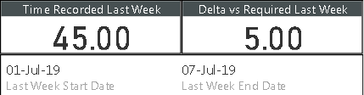
This first image is from the page in the report. For this user, you can see that dates and values are recorded.

ReportValues.PNG

When I look at a dashboard where I've pinned those same card visuals from the report, you can see that the values all appear blank. The Current Account card is a measure that returns userprincipalname(), and that does appear correctly.

DashboardValues1.PNG


I do not see this issue with my account, although from searching this forum I've seen that it's possible for the owner/admin to see different data than other users. I've configured RLS security settings applied with a distro list which includes myself and the user I'm testing with so there shouldn't be a difference in how they're applied.


Any ideas what the issue might be?


Thanks in advance.

1 ACCEPTED SOLUTION
Anonymous
Not applicable

I've deleted my report and the dataset, then published it again which appears to have fixed the issues. Looks like that's the easiest way to fix this problem rather than trying to fix the published version.

View solution in original post

3 REPLIES 3
Anonymous
Not applicable

Just found this as a potential solution (setting workspace to view-only for members). I'll test this out in the morning to see if it fixes the issue. https://stackoverflow.com/questions/50021342/row-level-security-not-working-in-power-bi-with-groups
Anonymous
Not applicable

Looks like that didn't fix the issue. Any other ideas?

Anonymous
Not applicable

I've deleted my report and the dataset, then published it again which appears to have fixed the issues. Looks like that's the easiest way to fix this problem rather than trying to fix the published version.

Helpful resources

Announcements
Power BI DataViz World Championships

Power BI Dataviz World Championships

The Power BI Data Visualization World Championships is back! Get ahead of the game and start preparing now!

December 2025 Power BI Update Carousel

Power BI Monthly Update - December 2025

Check out the December 2025 Power BI Holiday Recap!

FabCon Atlanta 2026 carousel

FabCon Atlanta 2026

Join us at FabCon Atlanta, March 16-20, for the ultimate Fabric, Power BI, AI and SQL community-led event. Save $200 with code FABCOMM.