
Get certified for free when you join Fabric Data Days 2026 and dive into Fabric, Power BI, SQL, AI, and other essential data skills.
Join nowData Days is here! Join us now for 60+ days of learning, challenges, and connection. Learn more
Hello,
Does Power BI have a format painter-type tool for styling visuals (in my case, cards)? I have many card visuals on a dashboard that I would like to format identically, and it would be great if I didn't have to manually style each one, but rather copy the format of one card to all remaining cards.
Any ideas?
Thanks in advance!
Solved! Go to Solution.
Hi @lenafherold ,
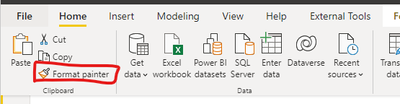
You could try Format Painter in Power BI Desktop.
The following Formatting Options are copied when using the Format Painter:
– All Background options.
– Title: All options apart from the actual text.
– Data Labels: All options except Display Units & Decimal Places.
– Data Colors: Default Color and, if the same field is used to drive color, copy the color/value assignments.
– X-Axis & Y-Axis: All options apart from Start/End.
– Legend: All options apart from the actual text.
– Borders: All options.
– Slicers: All options.
– Sentiment Colors (for Waterfall Charts): All options.
– If options don’t exist in the target visual (e.g. copying X-Axis options from a Scatter Chart onto a Column Chart) then they are just dropped.
The following is a sample ;
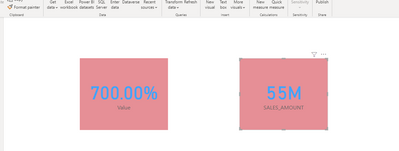
before use :(two card visual)
Afther use Format Painter:
And you could refer the following vedio:
(click here)
Did I answer your question? Mark my post as a solution!
Best Regards
Lucien
Hi @lenafherold ,
You could try Format Painter in Power BI Desktop.
The following Formatting Options are copied when using the Format Painter:
– All Background options.
– Title: All options apart from the actual text.
– Data Labels: All options except Display Units & Decimal Places.
– Data Colors: Default Color and, if the same field is used to drive color, copy the color/value assignments.
– X-Axis & Y-Axis: All options apart from Start/End.
– Legend: All options apart from the actual text.
– Borders: All options.
– Slicers: All options.
– Sentiment Colors (for Waterfall Charts): All options.
– If options don’t exist in the target visual (e.g. copying X-Axis options from a Scatter Chart onto a Column Chart) then they are just dropped.
The following is a sample ;
before use :(two card visual)
Afther use Format Painter:
And you could refer the following vedio:
(click here)
Did I answer your question? Mark my post as a solution!
Best Regards
Lucien
Oh wow. How did I miss that?
I don't think there's any sort of tool like that but Alternatively, you can select multiple visuals by holding down Ctrl (or click and hold to use the rectangle selection) and then format them all at the same time.
Don't miss out on Data Days, June 15 through August 7. Learn Fabric, Power BI, SQL, AI and more.
Check out the May 2026 Power BI update to learn about new features.
| User | Count |
|---|---|
| 16 | |
| 10 | |
| 10 | |
| 8 | |
| 7 |
| User | Count |
|---|---|
| 40 | |
| 36 | |
| 35 | |
| 29 | |
| 20 |