Don't miss your chance to take the Fabric Data Engineer (DP-700) exam on us!
Learn moreWe've captured the moments from FabCon & SQLCon that everyone is talking about, and we are bringing them to the community, live and on-demand. Starts on April 14th. Register now
Hi,
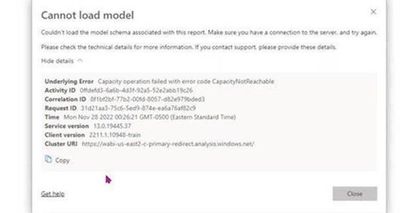
One of our dashboard which is connected in direct query mode to SAP as multidimensional source failed to load for a time window of 2 hours. The visuals threw the following error.
This dashboard has page refresh set up for every 20 secs and as per the refresh history log the refresh failed irregulary within the 2 hours time window but it resolved on it's own later (The refresh history only has failure status but no details of the failure).
I am not sure what caused it. Please help me if anybody is aware of the cause of issue or if was able to resolve it.
Solved! Go to Solution.
Hi , @Anonymous
According to your error details ID, I found the relevant error message in the internal database:
Premium Capacity Operation failed. ErrorCode: CapacityNotReachable; StatusCode: 503
For the error code of 503, we generally consider the error caused by the server disconnection and hang-up, and then I went to the internal problem website to search, and indeed on the 28th, there was a capacity drop in the us-east cluster, and there was an announcement posted on the Power BI support page at that time:
The ICM number is 352041615, according to the latest situation, this capacity drop problem has been temporarily fixed, and the announcement on the Power BI support page has disappeared, you can check whether the current refresh is running normally.
Thank you for your time and sharing, and thank you for your support and understanding of PowerBI!
Best Regards,
Aniya Zhang
If this post helps, then please consider Accept it as the solution to help the other members find it more quickly
Hi , @Anonymous
According to your error details ID, I found the relevant error message in the internal database:
Premium Capacity Operation failed. ErrorCode: CapacityNotReachable; StatusCode: 503
For the error code of 503, we generally consider the error caused by the server disconnection and hang-up, and then I went to the internal problem website to search, and indeed on the 28th, there was a capacity drop in the us-east cluster, and there was an announcement posted on the Power BI support page at that time:
The ICM number is 352041615, according to the latest situation, this capacity drop problem has been temporarily fixed, and the announcement on the Power BI support page has disappeared, you can check whether the current refresh is running normally.
Thank you for your time and sharing, and thank you for your support and understanding of PowerBI!
Best Regards,
Aniya Zhang
If this post helps, then please consider Accept it as the solution to help the other members find it more quickly
If you have recently started exploring Fabric, we'd love to hear how it's going. Your feedback can help with product improvements.
A new Power BI DataViz World Championship is coming this June! Don't miss out on submitting your entry.
Share feedback directly with Fabric product managers, participate in targeted research studies and influence the Fabric roadmap.
| User | Count |
|---|---|
| 29 | |
| 23 | |
| 17 | |
| 17 | |
| 14 |