cancel
Showing results for 
Search instead for 
Did you mean: 

The Power BI Data Visualization World Championships is back! Get ahead of the game and start preparing now! Learn more

Reply
Anonymous
Not applicable

Capacity Operation failed with error code CapacityNotReachable

Hi,


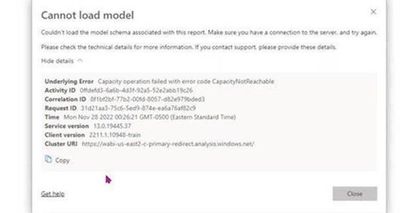
One of our dashboard which is connected in direct query mode to SAP as multidimensional source failed to load for a time window of 2 hours. The visuals threw the following error. 

swathisudheer_0-1669809757383.jpeg


This dashboard has page refresh set up for every 20 secs and as per the refresh history log the refresh failed irregulary within the 2 hours time window but it resolved on it's own later (The refresh history only has failure status but no details of the failure).


I am not sure what caused it. Please help me if anybody is aware of the cause of issue or if was able to resolve it.

1 ACCEPTED SOLUTION
v-yueyunzh-msft
Community Support
Community Support

Hi , @Anonymous 

According to your error details ID, I found the relevant error message in the internal database:

Premium Capacity Operation failed. ErrorCode: CapacityNotReachable; StatusCode: 503

For the error code of 503, we generally consider the error caused by the server disconnection and hang-up, and then I went to the internal problem website to search, and indeed on the 28th, there was a capacity drop in the us-east cluster, and there was an announcement posted on the Power BI support page at that time:

Support | Microsoft Power BI


The ICM number is 352041615, according to the latest situation, this capacity drop problem has been temporarily fixed, and the announcement on the Power BI support page has disappeared, you can check whether the current refresh is running normally.


Thank you for your time and sharing, and thank you for your support and understanding of PowerBI! 


Best Regards,

Aniya Zhang

If this post helps, then please consider Accept it as the solution to help the other members find it more quickly

View solution in original post

1 REPLY 1
v-yueyunzh-msft
Community Support
Community Support

Hi , @Anonymous 

According to your error details ID, I found the relevant error message in the internal database:

Premium Capacity Operation failed. ErrorCode: CapacityNotReachable; StatusCode: 503

For the error code of 503, we generally consider the error caused by the server disconnection and hang-up, and then I went to the internal problem website to search, and indeed on the 28th, there was a capacity drop in the us-east cluster, and there was an announcement posted on the Power BI support page at that time:

Support | Microsoft Power BI


The ICM number is 352041615, according to the latest situation, this capacity drop problem has been temporarily fixed, and the announcement on the Power BI support page has disappeared, you can check whether the current refresh is running normally.


Thank you for your time and sharing, and thank you for your support and understanding of PowerBI! 


Best Regards,

Aniya Zhang

If this post helps, then please consider Accept it as the solution to help the other members find it more quickly
Helpful resources

Announcements
Power BI DataViz World Championships

Power BI Dataviz World Championships

The Power BI Data Visualization World Championships is back! Get ahead of the game and start preparing now!

December 2025 Power BI Update Carousel

Power BI Monthly Update - December 2025

Check out the December 2025 Power BI Holiday Recap!

FabCon Atlanta 2026 carousel

FabCon Atlanta 2026

Join us at FabCon Atlanta, March 16-20, for the ultimate Fabric, Power BI, AI and SQL community-led event. Save $200 with code FABCOMM.