This is best Fabric, Power BI, SQL and AI community event. How do we know? The last event sold out! Save €200 with code FABCMTY200.
Register nowA new Data Days event is coming soon! This time we’re going bigger than ever. Fabric, Power BI, SQL, AI and more. Don't miss out.
Hi,
I have the following setup:
A SQL Database and an Excel are combined in a PowerBI dataset "20210118".
Ultimately two reports 20210302/2021022 are connected to these datasets via direct query.
When I share these reports with other people in the organisation they receive the "Cannot Load Model error"
How can I share the reports without the error?
Has this something to do with the following: https://docs.microsoft.com/en-us/power-bi/connect-data/service-gateway-enterprise-manage-ssas?
Thanks,
Solved! Go to Solution.
Hi @ScholesBI ,
The user opens the report shared in Direct query mode, and the gateway used by the person sharing the report needs to be used as a bridge to find the data source to obtain the data and datamode.
You can find the SQL server data source in Manage gateways-to see if the user is the User who owns the gateway data source of the SQL server.
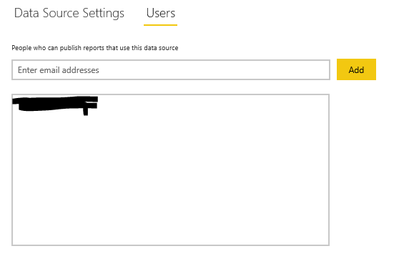
If it is an AS, you may also need to map the user name of its user, because when the user interacts with the report connected to the AS, the email we use to log in to Power BI will be treated as a valid user name through the gateway to our local AS server. But, some users log in to the power bi account does not match the UPN in his local AD. So we need manual user name remapping.
This is the relevant document, I hope to help you:
Add users to the data source:
https://docs.microsoft.com/en-us/power-bi/connect-data/service-gateway-data-sources
About AS mapping:
https://docs.microsoft.com/en-us/power-bi/connect-data/service-gateway-enterprise-manage-ssas
Manage AS data sources:
https://docs.microsoft.com/en-us/power-bi/connect-data/service-gateway-enterprise-manage-ssas
Best Regards,
Liu Yang
If this post helps, then please consider Accept it as the solution to help the other members find it more quickly.
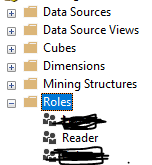
I have got same error and this is how i solved it. I added the user in SQL Analysis Server under Role this way we can give user access to the datasource and this solve the problem.
Hi @ScholesBI ,
The user opens the report shared in Direct query mode, and the gateway used by the person sharing the report needs to be used as a bridge to find the data source to obtain the data and datamode.
You can find the SQL server data source in Manage gateways-to see if the user is the User who owns the gateway data source of the SQL server.
If it is an AS, you may also need to map the user name of its user, because when the user interacts with the report connected to the AS, the email we use to log in to Power BI will be treated as a valid user name through the gateway to our local AS server. But, some users log in to the power bi account does not match the UPN in his local AD. So we need manual user name remapping.
This is the relevant document, I hope to help you:
Add users to the data source:
https://docs.microsoft.com/en-us/power-bi/connect-data/service-gateway-data-sources
About AS mapping:
https://docs.microsoft.com/en-us/power-bi/connect-data/service-gateway-enterprise-manage-ssas
Manage AS data sources:
https://docs.microsoft.com/en-us/power-bi/connect-data/service-gateway-enterprise-manage-ssas
Best Regards,
Liu Yang
If this post helps, then please consider Accept it as the solution to help the other members find it more quickly.
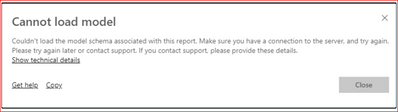
Thank you for your help. However solution was that the reports were shared without granting access to the related workspace. In this way users will not see the content.
Check out the May 2026 Power BI update to learn about new features.
Sign up to receive a private message when registration opens and key events begin.
If you have recently started exploring Fabric, we'd love to hear how it's going. Your feedback can help with product improvements.
| User | Count |
|---|---|
| 10 | |
| 8 | |
| 8 | |
| 6 | |
| 6 |
| User | Count |
|---|---|
| 24 | |
| 23 | |
| 22 | |
| 19 | |
| 16 |