cancel
Showing results for 
Search instead for 
Did you mean: 

Data Days is here! Join us now for 60+ days of learning, challenges, and connection. Learn more

Reply
ScholesBI
Frequent Visitor

Cannot load model error

Hi,

I have the following setup: 

A SQL Database and an Excel are combined in a PowerBI dataset  "20210118".

Ultimately two reports 20210302/2021022 are connected to these datasets via direct query.

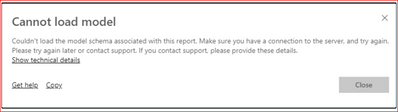
When I share these reports with other people in the organisation they receive the "Cannot Load Model error"

ScholesBI_2-1615291827604.png


ScholesBI_1-1615291591668.png


How can I share the reports without the error?

Has this something to do with the following: https://docs.microsoft.com/en-us/power-bi/connect-data/service-gateway-enterprise-manage-ssas?


Thanks,


1 ACCEPTED SOLUTION
Anonymous
Not applicable

Hi  @ScholesBI  ,

The user opens the report shared in Direct query mode, and the gateway used by the person sharing the report needs to be used as a bridge to find the data source to obtain the data and datamode.
You can find the SQL server data source in Manage gateways-to see if the user is the User who owns the gateway data source of the SQL server.
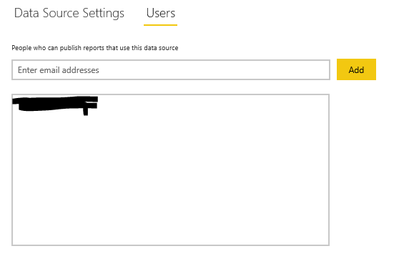
v-yangliu-msft_0-1615451885993.png

If it is an AS, you may also need to map the user name of its user, because when the user interacts with the report connected to the AS, the email we use to log in to Power BI will be treated as a valid user name through the gateway to our local AS server. But, some users log in to the power bi account does not match the UPN in his local AD. So we need manual user name remapping.


This is the relevant document, I hope to help you:

Add users to the data source:

https://docs.microsoft.com/en-us/power-bi/connect-data/service-gateway-data-sources

About AS mapping:

https://docs.microsoft.com/en-us/power-bi/connect-data/service-gateway-enterprise-manage-ssas

Manage AS data sources:

https://docs.microsoft.com/en-us/power-bi/connect-data/service-gateway-enterprise-manage-ssas


Best Regards,

Liu Yang

If this post helps, then please consider Accept it as the solution to help the other members find it more quickly.

View solution in original post

3 REPLIES 3
Rahel
Advocate II
Advocate II

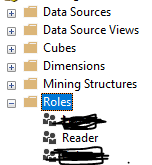
I have got same error and this is how i solved it. I added the user in SQL Analysis Server under Role this way we can give user access to the datasource and this solve the problem.

Rahel_0-1692353067439.png


Anonymous
Not applicable

Hi  @ScholesBI  ,

The user opens the report shared in Direct query mode, and the gateway used by the person sharing the report needs to be used as a bridge to find the data source to obtain the data and datamode.
You can find the SQL server data source in Manage gateways-to see if the user is the User who owns the gateway data source of the SQL server.

v-yangliu-msft_0-1615451885993.png

If it is an AS, you may also need to map the user name of its user, because when the user interacts with the report connected to the AS, the email we use to log in to Power BI will be treated as a valid user name through the gateway to our local AS server. But, some users log in to the power bi account does not match the UPN in his local AD. So we need manual user name remapping.


This is the relevant document, I hope to help you:

Add users to the data source:

https://docs.microsoft.com/en-us/power-bi/connect-data/service-gateway-data-sources

About AS mapping:

https://docs.microsoft.com/en-us/power-bi/connect-data/service-gateway-enterprise-manage-ssas

Manage AS data sources:

https://docs.microsoft.com/en-us/power-bi/connect-data/service-gateway-enterprise-manage-ssas


Best Regards,

Liu Yang

If this post helps, then please consider Accept it as the solution to help the other members find it more quickly.

Thank you for your help. However solution was that the reports were shared without granting access to the related workspace. In this way users will not see the content. 

Helpful resources

Announcements
Fabric Data Days is here Carousel

Fabric Data Days 2026

Don't miss out on Data Days, June 15 through August 7. Learn Fabric, Power BI, SQL, AI and more.

May Power BI Update Carousel

Power BI Monthly Update - May 2026

Check out the May 2026 Power BI update to learn about new features.

Power BI DataViz World Championships carousel

Power BI DataViz World Championships - June 2026

A new Power BI DataViz World Championship is coming this June! Don't miss out on submitting your entry.