We've captured the moments from FabCon & SQLCon that everyone is talking about, and we are bringing them to the community, live and on-demand. Starts on April 14th. Register now
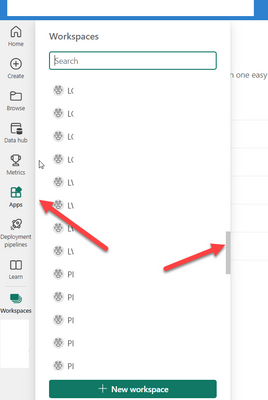
Rather recently, it has become impossible to scroll through workspaces in the Power BI service. Can scroll a little bit, then the list becomes jittery and we cannot scroll anymore. We're using Edge.
Anyone else experiencing this issue?
Solved! Go to Solution.
I found that if you scroll where my arrows are pointing, you wont have the problem lol.
Hi @jcampbell474 ,
Might just be a temporary issue.
Try the below:
1. Open in any other browser
2. Open in incognito mode
3. Check in https://powerbi.microsoft.com/en-us/support/ if any issue is logged by Microsoft themselves
Give a Thumbs Up if this post helped you in any way and Mark This Post as Solution if it solved your query !!! Proud To Be a Super User !!! |
Thank you. Works fine in Chrome. Just not in Edge (111.0.1661.54 (Official build) (64-bit))
We have a large number of workspaces, so scrolling is required. Can anyone who sees this post test in Edge to see if they can observe same behavior?
Yup Same behaviour May 17 2023. I have about 60 workspaces. Cant scroll down at all. Jittery.
Thank you. The issue persists for me. It's more than an inconvenience, it's not usable.
I found that if you scroll where my arrows are pointing, you wont have the problem lol.
Oh, wow. Excellent workaround! Thank you!!
If you have recently started exploring Fabric, we'd love to hear how it's going. Your feedback can help with product improvements.
A new Power BI DataViz World Championship is coming this June! Don't miss out on submitting your entry.
Share feedback directly with Fabric product managers, participate in targeted research studies and influence the Fabric roadmap.