cancel
Showing results for 
Search instead for 
Did you mean: 

July 7 - July 17 | Round 2 of the Power BI Dataviz World Championships. Don't miss your chance! Learn more

Reply
Anonymous
Not applicable

Bug Map Visual

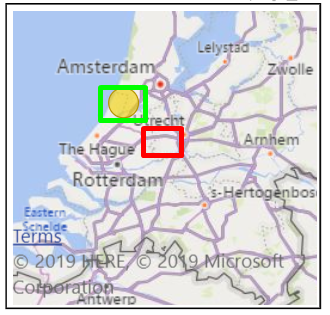
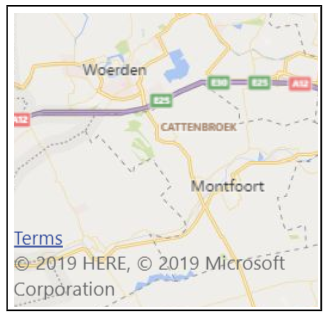
Since today the out of the box Bing map visual is bugged in the Power BI service (desktop is working fine). When filtering on a single location it isn’t showing the correct location on the map (screenshot 1). In screenshot 2 I have marked in red where the map was showing the incorrect location. I marked with green where it should have locked to show the correct location. So when I filter on a single location it looks like it is always showing a wrong piece of the map.

Screenshot 2Screenshot 2Screenshot 1Screenshot 1


I have tested it on different unrelated reports and different browsers, but the issue remained the same, if it’s a single location it gets incorrectly plotted on the map.

1 ACCEPTED SOLUTION
Anonymous
Not applicable

@Anonymous 

Discovered this yesterday. Went through the support channels to diagnose. Microsoft have responded with the following:


"Our product team mentioned that this is a known issue right now which is impacting many users.


Impact:

Users of the Bing Map visual may notice the auto-center feature is not locating the center correctly when all the data points are within a very small region (e.g. same city), or if they only have one data points. Each time they filter or cross-highlight, the autocenter may move to an incorrect location.


Workaround:

None – users will have to manually zoom out or pan the data points into focus each time they filter or crosshighlight.


Deployment Plan:

We will catch the 9.5 train this week which will get the fix by the end of next week with the standard deployment"

View solution in original post

4 REPLIES 4
kobi
Regular Visitor

Same thing for me.


On the desktop version, it works fine but on the service and embedded versions it does not
It does too much zoom in and completely loses the dot.

Anonymous
Not applicable

@Anonymous 

Discovered this yesterday. Went through the support channels to diagnose. Microsoft have responded with the following:


"Our product team mentioned that this is a known issue right now which is impacting many users.


Impact:

Users of the Bing Map visual may notice the auto-center feature is not locating the center correctly when all the data points are within a very small region (e.g. same city), or if they only have one data points. Each time they filter or cross-highlight, the autocenter may move to an incorrect location.


Workaround:

None – users will have to manually zoom out or pan the data points into focus each time they filter or crosshighlight.


Deployment Plan:

We will catch the 9.5 train this week which will get the fix by the end of next week with the standard deployment"

Hi, is the same for me too... it was working fine until few day ago, now the auto zoom bring the user to the wrong position. 
Any information when we get it solved?

Anonymous
Not applicable

You can follow the status of the issue here:


https://powerbi.microsoft.com/nl-nl/support/

Helpful resources

Announcements
FabCon and SQLCon Barcelona 2026

FabCon & SQLCon – Barcelona 2026

Join us in Barcelona for FabCon and SQLCon, the Fabric, Power BI, SQL, and AI community event. Save €200 with code FABCMTY200.

Fabric Community Sticker Design Challenge Barcelona Carousel

Fabric Community Sticker Challenge - Barcelona 2026

If you love stickers, then you will definitely want to check out our community sticker challenge, Barcelona edition!

July Power BI Update Carousel

Power BI Monthly Update - July 2026

Check out the July 2026 Power BI update to learn about new features.

Power BI DataViz World Championships carousel

Power BI DataViz World Championships - June 2026

A new Power BI DataViz World Championship is coming this June! Don't miss out on submitting your entry.

Top Kudoed Authors