cancel
Showing results for 
Search instead for 
Did you mean: 

Learn from the best! Meet the four finalists headed to the FINALS of the Power BI Dataviz World Championships! Register now

Reply
Anonymous
Not applicable

Bug: Data from Power BI Dataset differs when connecting using AS and in Direct Query Mode

Hi,

I tried connecting to a table in Power BI Dataset in Direct Query Mode (local dataset) and compared results by using a Analysis Service connector in import mode.


Output from both the queries differ. Output from DQ is fine while the results differ in AS table.


Note: This is not an issue regarding difference in refresh time of the import query and DQ output.


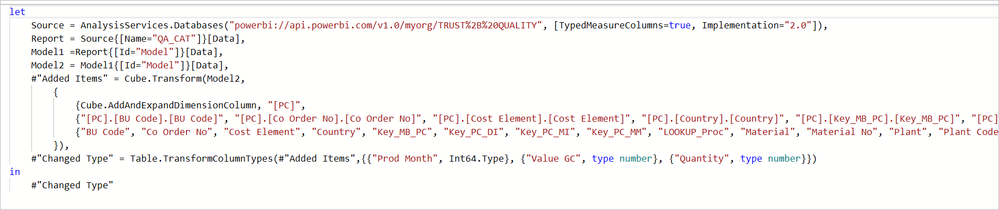
* I m not applying any transformations except for change type in the query. (All values are showing up in string format in AS query. So applied Change Type to correct the data type)

* Not applying any filters in query/page/visual

* There are no measures in the source table. All fields in the table are selected while importing data. 

*Tried substituting null values if any with 0 for numeric fields.... is this even necessary?


Observation:

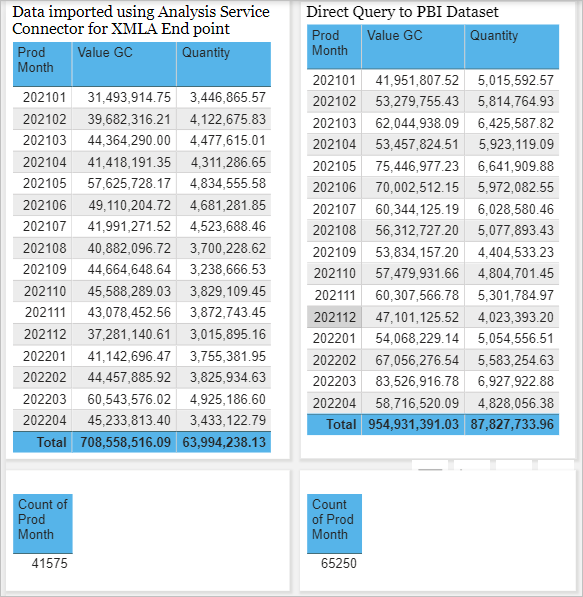
* Total Sum on numeric fields differ (please refer snapshot below)

* RowCount in AS is different from RowCount in DQ  which indicates missing entries.


XMLA_DQ.PNG

 Query Snapshot.PNG


1 ACCEPTED SOLUTION
Anonymous
Not applicable

@GilbertQ 


Thank you for looking into the issue.

No. The source of data is the same.  Only the connector and connection mode differs.


I introduced an index column in the table of original dataset and introduced it as the first column in the import query that used AS connector (to avoid aggregation). 

This resulted in matching values/ entries.

There are null values in some numeric columns which could have caused problem during aggregation.

I tried replacing null with zeros in the original dataset. But for some reason it didn't work!!!


I m not sure what is causing the issue.

But the work around of introducing a primary key column as the first column in the AS query seems to be working for me now.


Thanks & regards,

Mannu

View solution in original post

3 REPLIES 3
GilbertQ
Super User
Super User

Hi @Anonymous 


Ok awesome thanks for letting me know.!


Did I answer your question? Mark my post as a solution!

Proud to be a Super User!


Power BI Blog

GilbertQ
Super User
Super User

Hi @Anonymous 


From what you have put above there is clearly a difference between the 2 data sources.


What happens if you create a report to each one individually, do you get results that match?


If they do match then when you are bringing them together something is making the data change?


Did I answer your question? Mark my post as a solution!

Proud to be a Super User!


Power BI Blog

Anonymous
Not applicable

@GilbertQ 


Thank you for looking into the issue.

No. The source of data is the same.  Only the connector and connection mode differs.


I introduced an index column in the table of original dataset and introduced it as the first column in the import query that used AS connector (to avoid aggregation). 

This resulted in matching values/ entries.

There are null values in some numeric columns which could have caused problem during aggregation.

I tried replacing null with zeros in the original dataset. But for some reason it didn't work!!!


I m not sure what is causing the issue.

But the work around of introducing a primary key column as the first column in the AS query seems to be working for me now.


Thanks & regards,

Mannu

Helpful resources

Announcements
Power BI DataViz World Championships carousel

Power BI DataViz World Championships - June 2026

A new Power BI DataViz World Championship is coming this June! Don't miss out on submitting your entry.

Join our Fabric User Panel

Join our Fabric User Panel

Share feedback directly with Fabric product managers, participate in targeted research studies and influence the Fabric roadmap.

March Power BI Update Carousel

Power BI Community Update - March 2026

Check out the March 2026 Power BI update to learn about new features.

Top Kudoed Authors