Don't miss your chance to take the Fabric Data Engineer (DP-700) exam on us!
Learn moreWe've captured the moments from FabCon & SQLCon that everyone is talking about, and we are bringing them to the community, live and on-demand. Starts on April 14th. Register now
I have problems creating Automatic Machine Learning (AML) models, I follow the steps but the model is not generated, could you tell me if I should make any configuration of my workspace or what could generate that inconvenience. when I try to update it I get the following Error log: One or more upstream operations failed.. RootActivityId =...
Thanks
Juan Carlos
Solved! Go to Solution.
Hi @Juan_Carlos ,
Based on this tutorial, I can create a model successfully. Which step did you go wrong in the creation process?
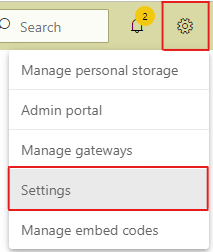
If in the final step, you may run into an error that states Credentials not found for data source or something similar, in which case you need to update your credentials so the data can be scored. To update credentials in the header bar select Settings > Settings.
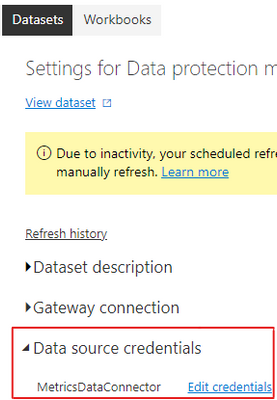
Select Datasets, expand Data source credentials, then select Edit Credentials.
Best Regards,
Community Support Team _ kalyj
If this post helps, then please consider Accept it as the solution to help the other members find it more quickly.
Thank you very much for your help, indeed that allowed me to create the model. I have an additional query, and it is for the case of the test and training tables where they are created or what permissions must be provided, since to test the model I tried to add another forecast table, but it indicated that there was a problem in the table training when adding the windows credentials did not allow me to save it.
Hi @Juan_Carlos ,
Based on this tutorial, I can create a model successfully. Which step did you go wrong in the creation process?
If in the final step, you may run into an error that states Credentials not found for data source or something similar, in which case you need to update your credentials so the data can be scored. To update credentials in the header bar select Settings > Settings.
Select Datasets, expand Data source credentials, then select Edit Credentials.
Best Regards,
Community Support Team _ kalyj
If this post helps, then please consider Accept it as the solution to help the other members find it more quickly.
Thank you very much for your help, indeed that allowed me to create the model. I have an additional query, and it is for the case of the test and training tables where they are created or what permissions must be provided, since to test the model I tried to add another forecast table, but it indicated that there was a problem in the table training when adding the windows credentials did not allow me to save it.
If you have recently started exploring Fabric, we'd love to hear how it's going. Your feedback can help with product improvements.
A new Power BI DataViz World Championship is coming this June! Don't miss out on submitting your entry.
Share feedback directly with Fabric product managers, participate in targeted research studies and influence the Fabric roadmap.