cancel
Showing results for 
Search instead for 
Did you mean: 

July 7 - July 17 | Round 2 of the Power BI Dataviz World Championships. Don't miss your chance! Learn more

Reply
Jakomer
New Member

Authentication Error

When trying to import an odata feed into Power BI I get an error saying user not authorized. Any type of authentication I use it says this, and I've tried typing in different credentials. Importing the same odata feed into Excel authenticates and works perfectly fine. I've tried clearing the cache and resetting all security settings in Power BI but that doesn't fix it. 


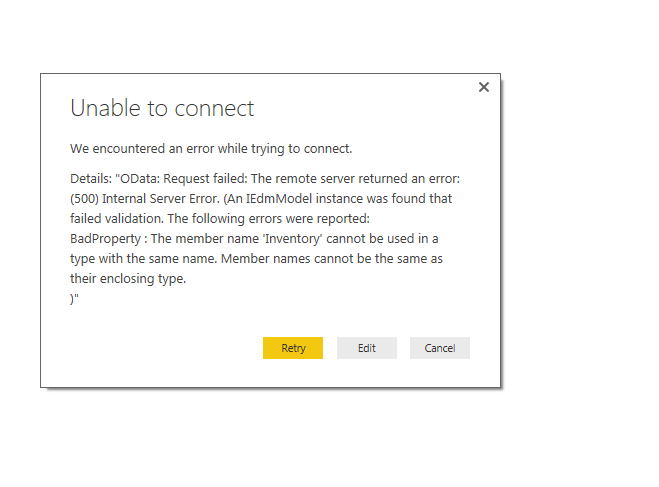
Also sometimes getting an error saying this: 

image001.png


Any help is appreciated

5 REPLIES 5
AlbertJan_JSR
Regular Visitor

At our business we've got a Dutch PWA (Project Online),

When trying to get OData feeds, some tables will load (like projects, resources) and others won't load (like Tasks and timesheetlinesactualdataset).


When I try to connect to the Dutch Tasks table with .../_api/ProjectData/[nl-NL]/Taken   or   .../_api/ProjectData/Taken

I get a Authentication Error.


When I try to connect to the English version of the OData stream with   .../_api/ProjectData/[en-US]/Tasks

there is no Authentication Error....


So maybe this can help. 🙂 


v-caliao-msft
Microsoft Employee
Microsoft Employee

Hi @Jakomer,


Please check if you can connect to the sample OData feed.
http://services.odata.org/V3/Northwind/Northwind.svc/
Here is a document about how to import data from an OData feed, please refer to the link below.
https://powerbi.microsoft.com/en-us/documentation/powerbi-desktop-tutorial-analyzing-sales-data-from...


If you can connect to sample OData feed, it indicators that the issue maybe related to your data source. In your scenario, please go through your data feed, find the "Inventory" and check if this member name is the same with their enclosing type name.


Regards,

Charlie Liao

Thank you for the reply. I can't seem to find anything within the data feed. I try several different feeds and get the same error, all of which work in Excel. 


Thank you.

Hi Jakome,


Have you checked the document I posted in the above. Since the OData feed works fine in excel, please double check your connect step and the URL.
Here is a document about how to import data from an OData feed, please refer to the link below.
https://powerbi.microsoft.com/en-us/documentation/powerbi-desktop-tutorial-analyzing-sales-data-from...


Regards,

Charlie Liao


Jakomer
New Member

When trying to import an odata feed into Power BI I get an error saying user not authorized. Any type of authentication I use it says this, and I've tried typing in different credentials. Importing the same odata feed into Excel authenticates and works perfectly fine. I've tried clearing the cache and resetting all security settings in Power BI but that doesn't fix it. 


Also sometimes getting an error saying this: 


Any help is appreciated

Helpful resources

Announcements
FabCon and SQLCon Barcelona 2026

FabCon & SQLCon – Barcelona 2026

Join us in Barcelona for FabCon and SQLCon, the Fabric, Power BI, SQL, and AI community event. Save €200 with code FABCMTY200.

60 days of Data Days Carousel

Data Days 2026

Join Fabric Data Days 2026: 60 days of free live/on-demand sessions, challenges, study groups, and certification opportunities.

Power BI DataViz World Championships carousel

Power BI DataViz World Championships - June 2026

A new Power BI DataViz World Championship is coming this June! Don't miss out on submitting your entry.