This is best Fabric, Power BI, SQL and AI community event. How do we know? The last event sold out! Save €200 with code FABCMTY200.
Register nowA new Data Days event is coming soon! This time we’re going bigger than ever. Fabric, Power BI, SQL, AI and more. Don't miss out.
When trying to import an odata feed into Power BI I get an error saying user not authorized. Any type of authentication I use it says this, and I've tried typing in different credentials. Importing the same odata feed into Excel authenticates and works perfectly fine. I've tried clearing the cache and resetting all security settings in Power BI but that doesn't fix it.
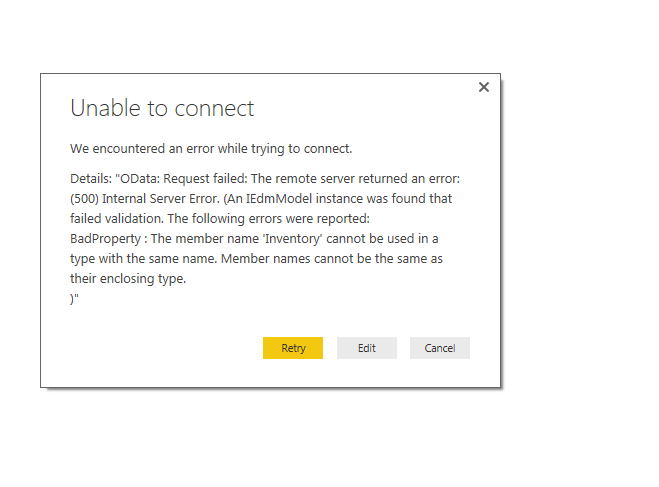
Also sometimes getting an error saying this:
Any help is appreciated
At our business we've got a Dutch PWA (Project Online),
When trying to get OData feeds, some tables will load (like projects, resources) and others won't load (like Tasks and timesheetlinesactualdataset).
When I try to connect to the Dutch Tasks table with .../_api/ProjectData/[nl-NL]/Taken or .../_api/ProjectData/Taken
I get a Authentication Error.
When I try to connect to the English version of the OData stream with .../_api/ProjectData/[en-US]/Tasks
there is no Authentication Error....
So maybe this can help. 🙂
Hi @Jakomer,
Please check if you can connect to the sample OData feed.
http://services.odata.org/V3/Northwind/Northwind.svc/
Here is a document about how to import data from an OData feed, please refer to the link below.
https://powerbi.microsoft.com/en-us/documentation/powerbi-desktop-tutorial-analyzing-sales-data-from...
If you can connect to sample OData feed, it indicators that the issue maybe related to your data source. In your scenario, please go through your data feed, find the "Inventory" and check if this member name is the same with their enclosing type name.
Regards,
Charlie Liao
Thank you for the reply. I can't seem to find anything within the data feed. I try several different feeds and get the same error, all of which work in Excel.
Thank you.
Hi Jakome,
Have you checked the document I posted in the above. Since the OData feed works fine in excel, please double check your connect step and the URL.
Here is a document about how to import data from an OData feed, please refer to the link below.
https://powerbi.microsoft.com/en-us/documentation/
Regards,
Charlie Liao
When trying to import an odata feed into Power BI I get an error saying user not authorized. Any type of authentication I use it says this, and I've tried typing in different credentials. Importing the same odata feed into Excel authenticates and works perfectly fine. I've tried clearing the cache and resetting all security settings in Power BI but that doesn't fix it.
Also sometimes getting an error saying this:
Any help is appreciated
Check out the May 2026 Power BI update to learn about new features.
Sign up to receive a private message when registration opens and key events begin.
If you have recently started exploring Fabric, we'd love to hear how it's going. Your feedback can help with product improvements.
| User | Count |
|---|---|
| 8 | |
| 8 | |
| 8 | |
| 7 | |
| 7 |
| User | Count |
|---|---|
| 23 | |
| 21 | |
| 18 | |
| 16 | |
| 15 |