Don't miss your chance to take exam DP-600 or DP-700 on us!
Request nowLearn from the best! Meet the four finalists headed to the FINALS of the Power BI Dataviz World Championships! Register now
Hi team,
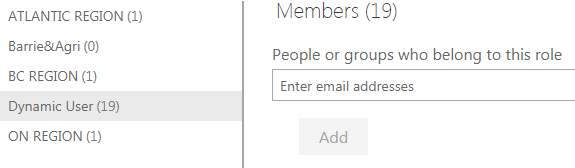
I am going to share one report with hundreds of people and I already set up the dynamic role in Power BI desktop. But I still need to add everyone's email manually online in the data security. Is there an easy way to assign all people in the dynamic role online?
Thanks,
Sherry
Solved! Go to Solution.
Hi @SC0614,
On Power BI Service, you can add security group as member of a role. See: Row-level security (RLS) with Power BI:https://docs.microsoft.com/en-us/power-bi/service-admin-rls
In your scenario, you can create security groups on O365 admin center. See create, edit, or delete a security group in the Office 365 admin center: https://docs.microsoft.com/en-us/office365/admin/email/create-edit-or-delete-a-security-group?redire... Then add all users into corresponding security group. Now you could just enter the group email.
Regards,
Daniel He
Hi @SC0614,
On Power BI Service, you can add security group as member of a role. See: Row-level security (RLS) with Power BI:https://docs.microsoft.com/en-us/power-bi/service-admin-rls
In your scenario, you can create security groups on O365 admin center. See create, edit, or delete a security group in the Office 365 admin center: https://docs.microsoft.com/en-us/office365/admin/email/create-edit-or-delete-a-security-group?redire... Then add all users into corresponding security group. Now you could just enter the group email.
Regards,
Daniel He
Thanks so much! This helps a lot!!
Regards,
Sherry
Share feedback directly with Fabric product managers, participate in targeted research studies and influence the Fabric roadmap.
Check out the February 2026 Power BI update to learn about new features.
| User | Count |
|---|---|
| 20 | |
| 18 | |
| 11 | |
| 11 | |
| 7 |
| User | Count |
|---|---|
| 43 | |
| 38 | |
| 21 | |
| 21 | |
| 17 |