FabCon is coming to Atlanta
Join us at FabCon Atlanta from March 16 - 20, 2026, for the ultimate Fabric, Power BI, AI and SQL community-led event. Save $200 with code FABCOMM.
Register now!- Power BI forums
- Get Help with Power BI
- Desktop
- Service
- Report Server
- Power Query
- Mobile Apps
- Developer
- DAX Commands and Tips
- Custom Visuals Development Discussion
- Health and Life Sciences
- Power BI Spanish forums
- Translated Spanish Desktop
- Training and Consulting
- Instructor Led Training
- Dashboard in a Day for Women, by Women
- Galleries
- Data Stories Gallery
- Themes Gallery
- Contests Gallery
- QuickViz Gallery
- Quick Measures Gallery
- Visual Calculations Gallery
- Notebook Gallery
- Translytical Task Flow Gallery
- TMDL Gallery
- R Script Showcase
- Webinars and Video Gallery
- Ideas
- Custom Visuals Ideas (read-only)
- Issues
- Issues
- Events
- Upcoming Events
Vote for your favorite vizzies from the Power BI Dataviz World Championship submissions. Vote now!
- Power BI forums
- Forums
- Get Help with Power BI
- Service
- Aggregating Quick Measures
- Subscribe to RSS Feed
- Mark Topic as New
- Mark Topic as Read
- Float this Topic for Current User
- Bookmark
- Subscribe
- Printer Friendly Page


- Mark as New
- Bookmark
- Subscribe
- Mute
- Subscribe to RSS Feed
- Permalink
- Report Inappropriate Content
Aggregating Quick Measures
I created a quick measure to show the sum of business workdays between two dates. In another visual, I want to show the average of workdays per project manager, however; it does not give me an option to summarize averages. Also, the total row is giving me a zero and not the sum. I am not sure what I am missing. I am using a date table to calculate business days. My formulas are below.

Workdays Between - Quick Measure
Workdays Between =
VAR Startday =
    SELECTEDVALUE ( 'Projects'[WarrantyStart] )
VAR Endday =
    SELECTEDVALUE ( 'Projects'[Invoice Sent] )
VAR Daterange =
    DATESBETWEEN ( Query2[Date], Startday, Endday )
VAR Daterangeworkdays =
    NATURALLEFTOUTERJOIN ( Daterange, Query2 )
RETURN
    IF (
        Startday = BLANK (),
        0,
        IF ( Endday = BLANK (), 0, SUMX ( Daterangeworkdays, Query2[Workday Number] ) )
    )
Date Table - Query2
Query2 is a date table. It uses conditionals columns that references Query1.
let
    Source = Query1(#date(2019, 1, 1), #date(2025, 12, 31), 10),
    #"Added Conditional Column" = Table.AddColumn(Source, "Workday", each if [DayOfWeekName] = "Sunday" then 0 else if [DayOfWeekName] = "Saturday" then "0" else 1, type any),
    #"Changed Type" = Table.TransformColumnTypes(#"Added Conditional Column",{{"Workday", Int64.Type}}),
    #"Renamed Columns" = Table.RenameColumns(#"Changed Type",{{"Workday", "Workday Number"}}),
    #"Inserted Is Odd" = Table.AddColumn(#"Renamed Columns", "Workday", each Number.IsOdd([Workday Number]), type logical)
in
    #"Inserted Is Odd"
Query1
let fnDateTable = (StartDate as date, EndDate as date, FYStartMonth as number) as table =>
  let
    DayCount = Duration.Days(Duration.From(EndDate - StartDate)),
    Source = List.Dates(StartDate,DayCount,#duration(1,0,0,0)),
    TableFromList = Table.FromList(Source, Splitter.SplitByNothing()),
    ChangedType = Table.TransformColumnTypes(TableFromList,{{"Column1", type date}}),
    RenamedColumns = Table.RenameColumns(ChangedType,{{"Column1", "Date"}}),
    InsertYear = Table.AddColumn(RenamedColumns, "Year", each Date.Year([Date]),type text),
    InsertYearNumber = Table.AddColumn(RenamedColumns, "YearNumber", each Date.Year([Date])),
    InsertQuarter = Table.AddColumn(InsertYear, "QuarterOfYear", each Date.QuarterOfYear([Date])),
    InsertMonth = Table.AddColumn(InsertQuarter, "MonthOfYear", each Date.Month([Date]), type text),
    InsertDay = Table.AddColumn(InsertMonth, "DayOfMonth", each Date.Day([Date])),
    InsertDayInt = Table.AddColumn(InsertDay, "DateInt", each [Year] * 10000 + [MonthOfYear] * 100 + [DayOfMonth]),
    InsertMonthName = Table.AddColumn(InsertDayInt, "MonthName", each Date.ToText([Date], "MMMM"), type text),
    InsertCalendarMonth = Table.AddColumn(InsertMonthName, "MonthInCalendar", each (try(Text.Range([MonthName],0,3)) otherwise [MonthName]) & " " & Number.ToText([Year])),
    InsertCalendarQtr = Table.AddColumn(InsertCalendarMonth, "QuarterInCalendar", each "Q" & Number.ToText([QuarterOfYear]) & " " & Number.ToText([Year])),
    InsertDayWeek = Table.AddColumn(InsertCalendarQtr, "DayInWeek", each Date.DayOfWeek([Date])),
    InsertDayName = Table.AddColumn(InsertDayWeek, "DayOfWeekName", each Date.ToText([Date], "dddd"), type text),
    InsertWeekEnding = Table.AddColumn(InsertDayName, "WeekEnding", each Date.EndOfWeek([Date]), type date),
    InsertWeekNumber= Table.AddColumn(InsertWeekEnding, "Week Number", each Date.WeekOfYear([Date])),
    InsertMonthnYear = Table.AddColumn(InsertWeekNumber,"MonthnYear", each [Year] * 10000 + [MonthOfYear] * 100),
    InsertQuarternYear = Table.AddColumn(InsertMonthnYear,"QuarternYear", each [Year] * 10000 + [QuarterOfYear] * 100),
    ChangedType1 = Table.TransformColumnTypes(InsertQuarternYear,{{"QuarternYear", Int64.Type},{"Week Number", Int64.Type},{"Year", type text},{"MonthnYear", Int64.Type}, {"DateInt", Int64.Type}, {"DayOfMonth", Int64.Type}, {"MonthOfYear", Int64.Type}, {"QuarterOfYear", Int64.Type}, {"MonthInCalendar", type text}, {"QuarterInCalendar", type text}, {"DayInWeek", Int64.Type}}),
    InsertShortYear = Table.AddColumn(ChangedType1, "ShortYear", each Text.End(Text.From([Year]), 2), type text),
    AddFY = Table.AddColumn(InsertShortYear, "FY", each "FY"&(if [MonthOfYear]>=FYStartMonth then Text.From(Number.From([ShortYear])+1) else [ShortYear]))
in
    AddFY
in
    fnDateTable
Solved! Go to Solution.
- Mark as New
- Bookmark
- Subscribe
- Mute
- Subscribe to RSS Feed
- Permalink
- Report Inappropriate Content
Hi @rachaelwalker ,
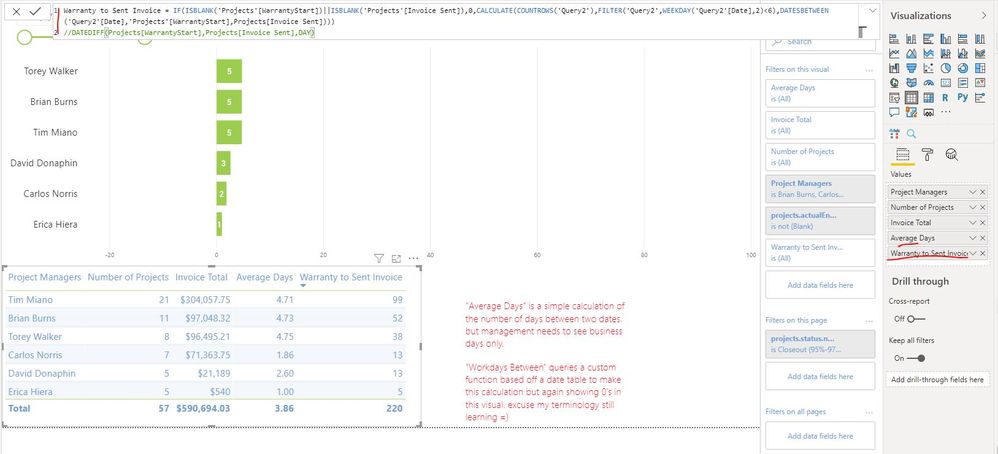
Please try to update the existed calculated column "Warranty to Sent Invoice" as below to get the working days between two days:
Warranty to Sent Invoice =
IF (
    ISBLANK ( 'Projects'[WarrantyStart] ) || ISBLANK ( 'Projects'[Invoice Sent] ),
    0,
    CALCULATE (
        COUNTROWS ( 'Query2' ),
        FILTER ( 'Query2', WEEKDAY ( 'Query2'[Date], 2 ) < 6 ),
        DATESBETWEEN (
            'Query2'[Date],
            'Projects'[WarrantyStart],
            Projects[Invoice Sent]
        )
    )
)
Best Regards
Rena

- Mark as New
- Bookmark
- Subscribe
- Mute
- Subscribe to RSS Feed
- Permalink
- Report Inappropriate Content
Hi @rachaelwalker ,
It seems the total value can't be calculated correctly, you can refer the methods in the following documentations to resolve it.
Sum of values in a measure with divide measure
If the above methods can't resolve your problem, please share more sample data or your pbix file. Later we will make troubleshooting on it based on provided information. Thank you.
Best Regards
Rena
- Mark as New
- Bookmark
- Subscribe
- Mute
- Subscribe to RSS Feed
- Permalink
- Report Inappropriate Content
I believe these solutions would work if my measure was a calculated column. I tried using a calculated column instead, but it is returning all zeros.

- Mark as New
- Bookmark
- Subscribe
- Mute
- Subscribe to RSS Feed
- Permalink
- Report Inappropriate Content
Hi @rachaelwalker ,
The data of table visual in your report are all from table "Projects"? Could you please provide some sample data in this table? It is better if you can provide your pbix file. Then I can make troubleshooting based on your report file, it will be very helpful to find the root cause of problem. Thank you.
Best Regards
Rena
- Mark as New
- Bookmark
- Subscribe
- Mute
- Subscribe to RSS Feed
- Permalink
- Report Inappropriate Content
For security reasons, I will send it directly to you
- Mark as New
- Bookmark
- Subscribe
- Mute
- Subscribe to RSS Feed
- Permalink
- Report Inappropriate Content
Hi @rachaelwalker ,
Please try to update the existed calculated column "Warranty to Sent Invoice" as below to get the working days between two days:
Warranty to Sent Invoice =
IF (
    ISBLANK ( 'Projects'[WarrantyStart] ) || ISBLANK ( 'Projects'[Invoice Sent] ),
    0,
    CALCULATE (
        COUNTROWS ( 'Query2' ),
        FILTER ( 'Query2', WEEKDAY ( 'Query2'[Date], 2 ) < 6 ),
        DATESBETWEEN (
            'Query2'[Date],
            'Projects'[WarrantyStart],
            Projects[Invoice Sent]
        )
    )
)
Best Regards
Rena
Helpful resources

Power BI Dataviz World Championships
Vote for your favorite vizzies from the Power BI World Championship submissions!

Join our Community Sticker Challenge 2026
If you love stickers, then you will definitely want to check out our Community Sticker Challenge!

Power BI Monthly Update - January 2026
Check out the January 2026 Power BI update to learn about new features.

FabCon Atlanta 2026
Join us at FabCon Atlanta, March 16-20, for the ultimate Fabric, Power BI, AI and SQL community-led event. Save $200 with code FABCOMM.

| User | Count |
|---|---|
| 18 | |
| 10 | |
| 9 | |
| 8 | |
| 7 |


| User | Count |
|---|---|
| 48 | |
| 38 | |
| 36 | |
| 25 | |
| 20 |


