cancel
Showing results for 
Search instead for 
Did you mean: 

July 7 - July 17 | Round 2 of the Power BI Dataviz World Championships. Don't miss your chance! Learn more

Reply
AlexEveritt
Frequent Visitor

Adding/Editing Data

Hi, I'm new to PowerBI so do excuse me if this is a dumb question.

I've noticed in previous versions of PowerBI that adding data or editing data is easy. Clicking the table icon and then doing what you need to do to the data.

For the life of me I cannot find how to do this in the new powerbi without having to create a new report, which is obviously far from ideal.

Can anyone advise how I can edit the data I entered to start my report? I want to add more columns, and maybe have the capability to change the data? For example, I might want to change a system name, or change a score number.

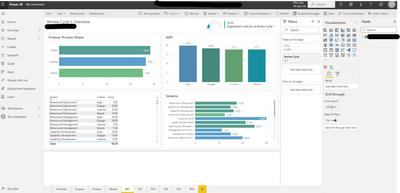
Below is what I see when editing my reports.
Thanks in advance

AlexEveritt_0-1648137058684.png


1 ACCEPTED SOLUTION

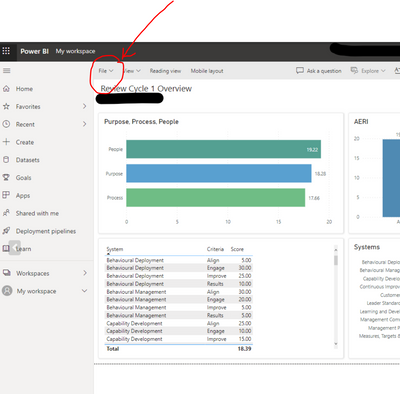
Click file ( refer picture) and click "Download this file".

Tutu_in_YYC_0-1648141013812.png


Once downloaded, open that file, it should have extension .pbix. Then Power BI desktop will load. 


View solution in original post

5 REPLIES 5
Tutu_in_YYC
Super User
Super User

Hi Alex,
Welcome to PowerBI! So you cannot edit data/transformation on Power BI service. You have to do that in Power BI Desktop. It is a program that you may have installed on your computer.

In Power BI desktop, you will have access to Power Query for transformation ( adding removing columns etc) and edit the relationships and data model.

In Power BI service (browser), you can only edit visuals.

Hope this helps!

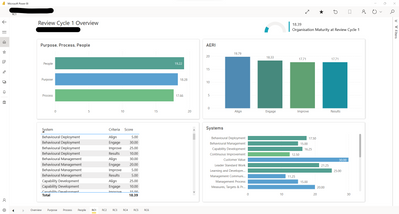
Yes I have the desktop app. But i'm still unsure how to do this. Cannot find power query either. Any help? 

AlexEveritt_0-1648138198837.png


Click file ( refer picture) and click "Download this file".

Tutu_in_YYC_0-1648141013812.png


Once downloaded, open that file, it should have extension .pbix. Then Power BI desktop will load. 


Ahh, I thought I had Power BI Desktop but it was just the free app version - feel like an idiot but also feel like the multiple variations of Power BI are a bit confusing and misleading. None the less, I'm off and away. Thanks for your help!

you are not the only one!😅 all the best!

Helpful resources

Announcements
FabCon and SQLCon Barcelona 2026

FabCon & SQLCon – Barcelona 2026

Join us in Barcelona for FabCon and SQLCon, the Fabric, Power BI, SQL, and AI community event. Save €200 with code FABCMTY200.

60 days of Data Days Carousel

Data Days 2026

Join Data Days 2026: 60 days of free live/on-demand sessions, challenges, study groups, and certification opportunities.

Power BI DataViz World Championships carousel

Power BI DataViz World Championships - June 2026

A new Power BI DataViz World Championship is coming this June! Don't miss out on submitting your entry.

Top Solution Authors