Get certified for free when you join Fabric Data Days 2026 and dive into Fabric, Power BI, SQL, AI, and other essential data skills.
Join nowTry your skills in the Power BI Dataviz World Championship! Round one ends June 26. Join now
Hi, I would like to calculate the total # of results for a given row/person for pass or fail. What is the based way to perform this and display in a new column and potentially a tile?
| Person | Test 1 | Test 2 | Test 3 | Test 4 |
| Adam | Pass | Pass | Fail | Pass |
| John | Pass | Fail | Pass | Pass |
| Joe | Fail | Pass | Fail | Fail |
Solved! Go to Solution.
Hi, @ez1138
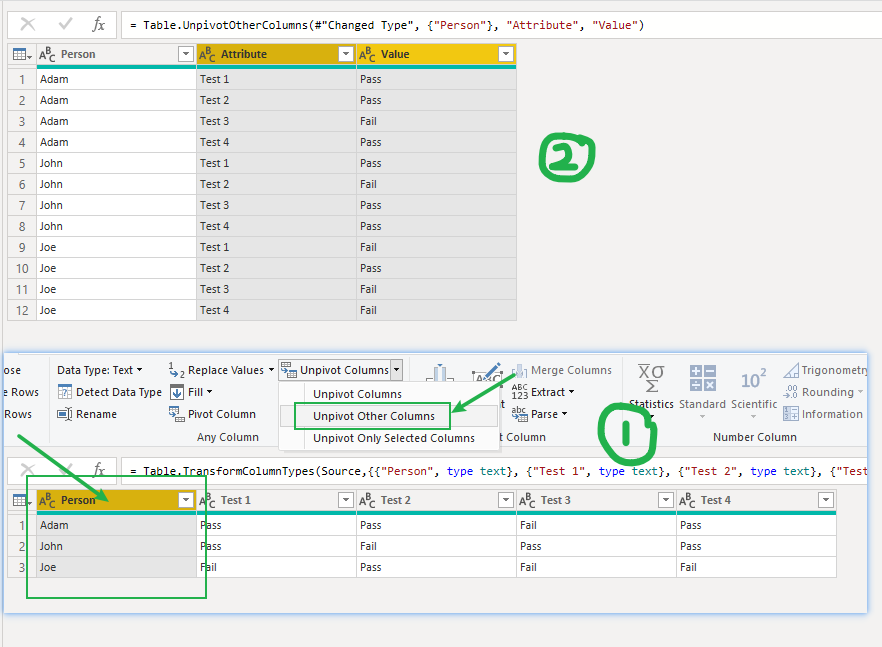
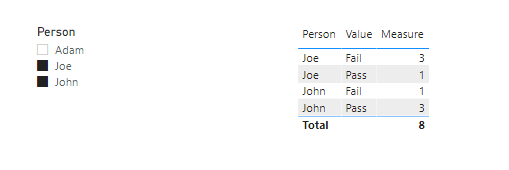
According to your description, I think you can use'unpivot other columns' function in PQ first, then create a measure to display your desired result.
Like this:
Measure =
SUMX (
SUMMARIZE (
'Table',
'Table'[Person],
'Table'[Value],
"a",
VAR a =
COUNTROWS ( FILTER ( 'Table', [Value] = "Fail" ) )
VAR b =
COUNTROWS ( FILTER ( 'Table', [Value] = "Pass" ) )
RETURN
IF ( SELECTEDVALUE ( 'Table'[Value] ) = "Pass", b, a )
),
[a]
)Here is my sample .pbix file.Hope it helps.
If it doesn’t solve your problem, please feel free to ask me.
Best Regards
Janey Guo
If this post helps, then please consider Accept it as the solution to help the other members find it more quickly.
Hi, @ez1138
According to your description, I think you can use'unpivot other columns' function in PQ first, then create a measure to display your desired result.
Like this:
Measure =
SUMX (
SUMMARIZE (
'Table',
'Table'[Person],
'Table'[Value],
"a",
VAR a =
COUNTROWS ( FILTER ( 'Table', [Value] = "Fail" ) )
VAR b =
COUNTROWS ( FILTER ( 'Table', [Value] = "Pass" ) )
RETURN
IF ( SELECTEDVALUE ( 'Table'[Value] ) = "Pass", b, a )
),
[a]
)Here is my sample .pbix file.Hope it helps.
If it doesn’t solve your problem, please feel free to ask me.
Best Regards
Janey Guo
If this post helps, then please consider Accept it as the solution to help the other members find it more quickly.
The process is called unpivoting - transforming your source data into usable format.
let
Source = Table.FromRows(Json.Document(Binary.Decompress(Binary.FromText("i45WckxJzFXSUQpILC5GUG6JmTkwXqxOtJJXfkYedlkURakYklAemIqNBQA=", BinaryEncoding.Base64), Compression.Deflate)), let _t = ((type nullable text) meta [Serialized.Text = true]) in type table [Person = _t, #"Test 1" = _t, #"Test 2" = _t, #"Test 3" = _t, #"Test 4" = _t]),
#"Unpivoted Other Columns" = Table.UnpivotOtherColumns(Source, {"Person"}, "Attribute", "Value")
in
#"Unpivoted Other Columns"
Don't miss out on Data Days, June 15 through August 7. Learn Fabric, Power BI, SQL, AI and more.
Check out the May 2026 Power BI update to learn about new features.
| User | Count |
|---|---|
| 17 | |
| 11 | |
| 11 | |
| 8 | |
| 8 |
| User | Count |
|---|---|
| 40 | |
| 36 | |
| 35 | |
| 35 | |
| 20 |